For K-12 teachers

FERPA-safe by design

Never again feel that stomach-punch, unprepared dread before a parent conference, tough phone call home, stressful IEP, counselor or Admin meeting—NEVER AGAIN!

Questions first? 52 answers →

4 weeks free · no card to start

Turn on Teacher Supreme as you walk your classroom. Agentic Angel quickly and easily shows evidence-based instructional responses. Say a student’s name twice. Speak what you see and hear when interacting with your student or team. “Good job” just doesn’t cut it.

Instead, In-the-Moment Mentor maps your words to 24 research-backed indicators and shows you three levels of coaching—TRY FIRST, SAY NEXT, GO DEEPER—so every interaction teaches students to aim higher and become self-directed, lifelong learners.

Approve what stays in your student portfolio of learning; it’s time-stamped and remembered. Your professionalism is showcased on your phone, email or report. Stop guessing because you have the receipts. Save time, be prepared, calm, protected, and fully in control.

FERPA-safe by design — every name you type or say becomes a code on your phone before the AI reads it. See how ↓

Students please their teacher: amplify whatever you notice out loud. Praise them — they chase compliments. Instead, Teacher Supreme shows you the exact thinking steps — “You went back to the page and found evidence” — and your students chase the thinking process, becoming self-directed learners. That is teaching a student to fish. Every student interaction matters. Elevate your IMPACT.

A student talks back, shuts down or seems to just stop caring — and you have a moment to decide what to say. Teacher Supreme gives the teacher what research shows actually works.

Then Teacher Supreme records the teacher’s exact words, time-stamped. One tap turns that into a polished parent phone script, text, email, or the 504 / IEP report, ready for you to send. So when you need it, parents, counselors and your principal see your professionalism — backed by a detailed record instead of a recollection.

It’s a new school year. Ready to raise your impact?

For K-12 teachers

FERPA-safe by design

Good job isn’t teaching.

Your student explains how they got the answer — every step, out loud. The thing you have been waiting all year to hear.

You say “good job.” And you feel the pressure to keep moving, because the rest of your students are waiting.

That was the moment to name what that student did. It happens hundreds of times a week, and it happened to me — not from not knowing, but because nobody retrieves the exact research finding while the pressure to keep moving is already on you.

James Morris · 35 years in K-12 classrooms · founder

Questions first? 52 answers →

4 weeks free · no card to start

The words, in the second you need them

Here is what to say instead.

A classroom of students working and one with a hand up, over four of the twenty-four indicators a teacher can log: Explains Reasoning, Peer Teaching, Clarifying Questions, Sustained Focus — each with the words to say and the research behind it.

One tap. You say what you saw. This comes back — three levels deep, with the research behind each one.

  1. Try first

    You explained every step instead of jumping to the answer. That is showing your reasoning — show your steps again whenever a problem gets hard.

    Praise changes what a student does next only when the strategy has a name they can carry and a named occasion to use it again — a bare compliment leaves nothing to repeat. Mueller & Dweck (1998) process praise

  2. Say next

    That is one route to the answer. Now show me a second way to reach the same answer.

    What the student does: Rebuilds the solution a different way instead of reciting the first from memory.

    A second explanation cannot be pulled from memory — the student must rebuild the reasoning from the start, and that rebuilding is where the learning actually happens. Chi et al. (1994) self-explanation

  3. Go deeper

    Send the student to teach a partner with one rule: explain each step and why it works, so the partner can solve the next problem alone.

    What the student does: Teaches every step aloud — the steps they skip or fumble are the ones they only half-knew.

    Explaining each step to another person forces every step into words, exposing exactly which steps were understood and which were held loosely. Rosenshine (2012)

Twenty-four of these, one for each thing a teacher can actually see a student do.

Teams · the walk-around

Walk the room once. Reach every student.

A teacher standing at a table of four working students, phone clipped to the clipboard already being carried, saying what is seen out loud. Panels underneath read: your phone rides the clipboard, one lap, four teams, and the note lands on the right student under the right indicator. Voice is teacher-activated only.

Your students already sit in table groups — four students, sometimes five. Assign them to teams once (by tap, or just say “team one is Priya Raman, Jonas Weber, Harper Lin, and Nolan Reyes”). Then, mid-lesson, stand at any table and talk the way you already talk:

🎙 TEACHER, STANDING AT THE TABLE

“Team one. Priya is backing up their answer with text evidence from paragraph two. Jonas explained it to his tablemate how the character changed. Harper said I don’t know the second I asked and won’t even try. Nolan is in a side conversation with his neighbor while I’m still talking.”

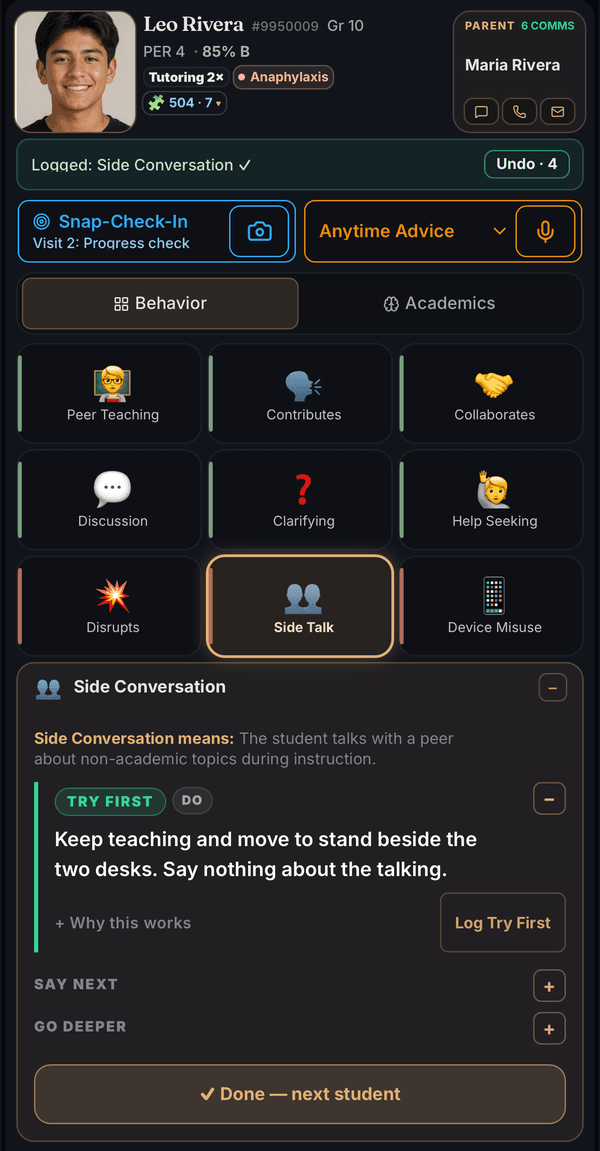
Pause. This slides up — one card per student it heard, each with the best-match indicator, your own words as the evidence, and the coaching move for that moment:

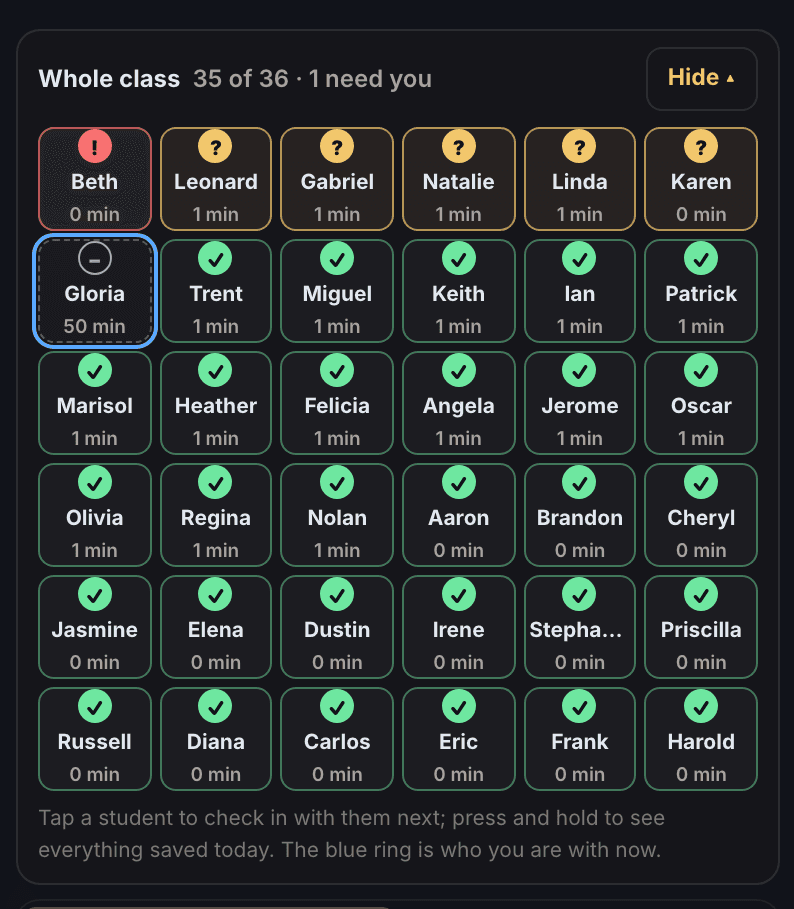
Team 1 · Agentic Angel heard 4 students

Check each card, then say “log them all” or tap Approve All

P

Priya Raman

⚖️ Evidence-Based Defense

Change✓ Approve

“Priya is backing up their answer with text evidence from paragraph two”

💡 Coach: Prompt “What evidence makes you say that?” Then have them add one more supporting piece.

J

Jonas Weber

🧑‍🏫 Peer Teaching

Close✓ Approve

“Jonas explained it to his tablemate how the character changed”

🧑‍🏫Peer Teaching
🤝Peer Collaboration

💡 Coach: Pair strategically — “Teach them the way you just explained it to me.” Circulate, reinforce clear explanations.

H

Harper Lin

🤷 IDK Response

Change✓ Approve

“Harper said I don’t know the second I asked and won’t even try”

💡 Coach: Replace with “What do you notice?” or “Tell me one thing you do know.” Give wait time and scaffold.

N

Nolan Reyes

👥 Side Conversation

Close✓ Approve

“Nolan is in a side conversation with his neighbor while I’m still talking”

👥Side Conversation
💥Disrupts Others

Saw it differently? Tap the other bubble — yours wins.

💡 Coach: Non-verbal cue or proximity. Quietly: “Save that story for lunch — right now we need your focus here.”

🎙 “log them all”

✓ Approve All (4)
A faithful sample of the Team review sheet — every student shown is fictional. Nothing logs until you approve, by voice or by tap.

One breath per student, and each landed in the right place — all four dimensions of the grid, sorted for you, time-stamped on each student’s card the moment you approve:

⚖️Priya Raman · Evidence-Based Defense

Cognitive Investment

argumentation with evidence — high-impact elaboration (Hattie)

🧑‍🏫Jonas Weber · Peer Teaching

Active Participation

peer tutoring — one of the sturdiest figures in Hattie’s synthesis (an association, not a promised gain)

🤷Harper Lin · IDK Response

Cognitive Withdrawal

the learned-helplessness shutdown — caught early

👥Nolan Reyes · Side Conversation

Off-Task Behavior

a pattern by Friday, not a memory by June

💡 COACHING MOMENT · PEER TEACHING

Pair strategically — “Teach them the way you just explained it to me.” Circulate, reinforce clear explanations.

Every one of the 24 indicators carries its own coaching move like this one — and where the research publishes an effect size, it rides along (peer tutoring d≈0.5, classroom discussion d≈0.8, summarization d≈0.8 — the same approximations the library prints, from Hattie’s own figures). The numbers your principal already knows from Hattie’s Visible Learning.

Teams hold four, five, or however many actually sit together — up to eight teams per class. Now do the math a teacher does: eight teams of four is 32 students; tables of five make it 40. One lap around the room — a sentence or two at each table — and every student you described that period is on the record, with evidence, before the bell.

Why it is built this way

Give a student a fish, or teach a student to fish.

“Teach them the way you just explained it to me.” That is a coaching move, and every one of the 24 indicators carries one. It does not describe the student. It names the strategy the student just used, in words that student can repeat on the next problem, and the one after that.

That is the whole design. Teacher Supreme does not teach your students — it shows you the words, and you say them. We are not here to help you remember more. We are here to help you name what a student did, so the student can do it again on purpose.

Which is why this is the opposite of software that does the teaching for you. It never speaks to your students. It puts the research-backed words on that student's card while you are still working with the student.

Questions first? 52 answers →

4 weeks free · no card to start

The job, honestly

You’re standing in front of a full classroom.

And you’re supposed to know — right now, from memory — who’s struggling. Who has an IEP, and what it actually says. Who has the peanut allergy. Who hasn’t said a word in a week. Who’s trying out for track on Friday. Whose brother is in the hospital. Who blew up yesterday and needs a fresh start today. Who finally turned something in — and needs to hear that you noticed.

This is not a cubicle job. Nobody books a meeting to talk to you. Every student in the room needs something from you today, and the one who decides you did not notice them is the one who stops trying in your class first — the assignment comes back blank, the hand stays down, and by November you have stopped expecting anything else.

Holding all of those details in one human memory is not possible. Teacher Supreme holds them for you — that Marcus reads the board slowly and needs the notes handed to him, that Priya asked the first real question of the year on Tuesday, that Aiden’s grandmother died in October. So on the day it matters you can say the specific thing, out loud, to the student it belongs to. You stay the teacher. You make every call.

Mr. Morris walks between tables of working students — one lap of a full classroom, seeing every student, his phone riding in his shirt pocket with a small green light on. Nothing in his hands but the room.

The part nobody tells new teachers

“Let’s go. I’ve told you twice.”

You know this moment too. A student sitting in front of work that is not happening, a room full of others who need you, and the only move anybody ever handed you is to say it again, louder. It starts to feel personal. It is not.

Decades of classroom research hold better moves for exactly this minute — small ones. A couple of quick questions the student can answer. Having them say the direction back in their own words. Moves with names and evidence behind them. Most teachers were simply never handed them.

PowerPoint research sentences, easy.Remembering the words mid-lesson, hard.

A school cafeteria at the end of a training day: lunch tables pushed together, rows of tired teachers facing the front with notebooks and coffee cups, listening to a presenter beside a smartboard. Late afternoon light through the windows.

Districts pay specialists thousands for an afternoon on pedagogy — the research, the effect sizes, the questioning techniques. Good material. And it fades fast, because it arrived in a lecture hall in August instead of your classroom in October, at the moment a student put a pencil down.

Teacher Supreme keeps 24 research-backed indicators and the coaching for each one at your side, and shows you the right one on that student’s card while you are still working with the student. Three levels deep, with the researcher’s name on every move. In-context professional development — the workshop, delivered mid-moment.

What a noticed moment leaves behind

The words. The goal. The proof.

Mr. Morris crouches beside one desk during quiet work, his phone lying screen-up on a wooden clipboard held level in his hand, glowing soft green, while a student points proudly at a page in an open history book; the rest of the class works on in warm light.

Fourth period, U.S. History. Independent practice — the class is writing, and you are walking the room. At one desk a student has written that the tariff hurt farmers, so you stop and ask, “How do you know?” Instead of repeating the claim louder, the student opens the reading and finds the line about grain prices. Proof, found on the page, unprompted.

Most of that moment usually evaporates by the end of the passing period. When you notice it with Teacher Supreme, it leaves three things behind — the words you say, the goal the student keeps, and the proof in the record.

The words

The exact words, on that student’s card while you are still working with the student:

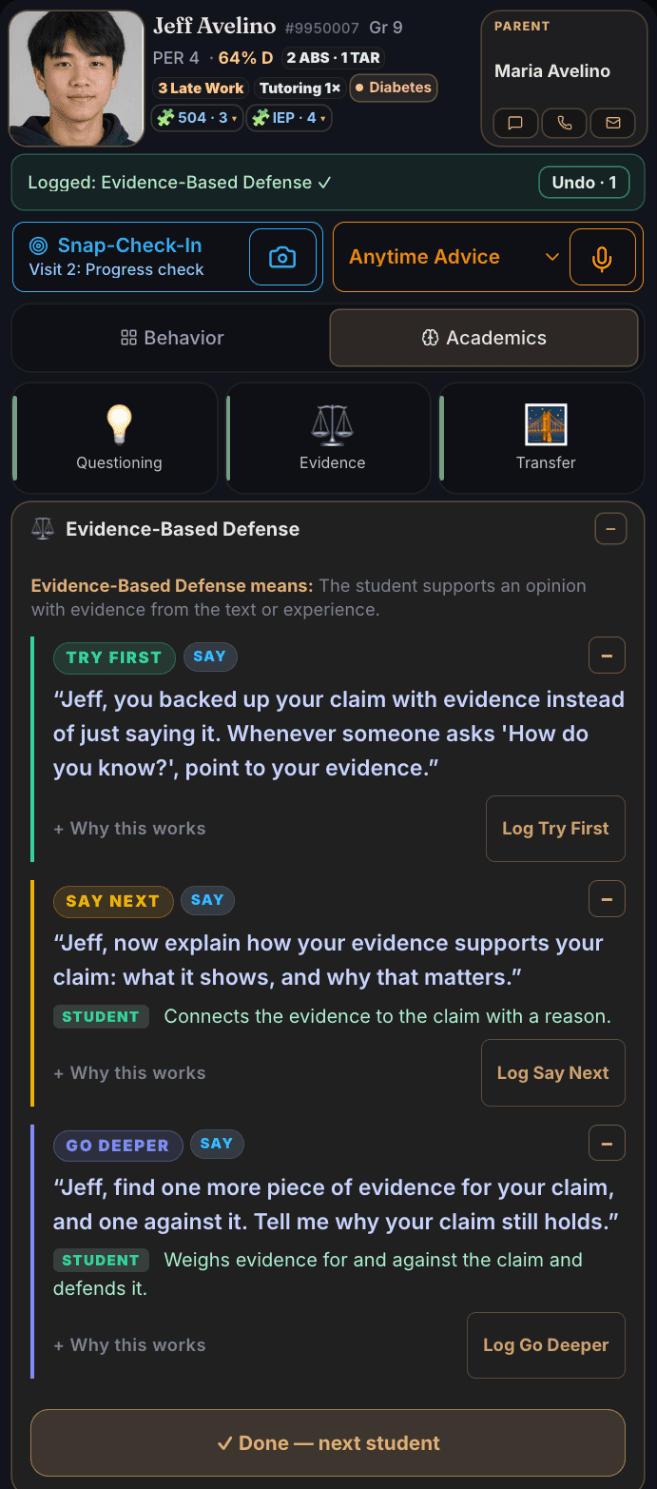
You went back to the page and found proof. That is backing your position with evidence. When someone asks “how do you know?” — go back to the reading and find the evidence that supports your claim.

Word for word from the coaching library — Mueller & Dweck (1998) process praise.

The goal

Praise that hands a student a goal to aim for, not a compliment to remember. The card’s next step asks the student to find one more piece of evidence that supports the claim — and one that argues against it. The green line names what the student does with both:

Weighs both pieces and explains what the disagreeing evidence does to their claim.

The next time someone asks the student “how do you know?”, the student knows exactly what to reach for — the reading, and the line that proves the claim.

The proof

The moment becomes a record: dated, on the student’s card, named Evidence-Based Defense — and now leveled. Every coaching move carries its Hattie & Timperley (2007) feedback level: task fixes the work, process names the strategy, self-regulation hands the student the checking.

And at the bell, the Rounds report shows the shape of your own walk during independent practice: how many of your students you actually reached, the students you never got to — by name — and your feedback mix across those three levels. Performance feedback on a teacher’s own practice is the evidence-based part — Fallon et al. (2015), Exceptional Children; Layden, Crowson & Hayden (2023), Journal of Special Education.

AI that hands the teacher the words — instead of trying to be the teacher. And a teacher’s Rounds numbers belong to the teacher — never uploaded, never visible to any administrator. That is the architecture, not a policy.

Nothing to remember

How it works

Walk your classroom. Say what you see.

  1. 1

    Agentic Angel hears the teacher say Noah’s name twice

    Say the student’s name twice within about six seconds. Ordinary conversation gets you there without trying — and when you want the card straight away, say the student’s name twice quickly: “Noah, Noah.” Either way, Noah’s card comes up on your phone. You never touched the screen.

    🎤 The teacher walks over to Noah’s desk and observes what Noah is doing.

    Morning, Noah. Nice work getting straight into the warm-up, Noah.

    The real Teacher Supreme card on a phone the moment the trigger fires: Noah Garcia, grade 10, period 2, with the parent tile and the attendance, late-work and grade chips. The voice bar quotes the teacher back word for word — “Noah nice getting straight into the warm-up Noah” — above “say log it to confirm, or tap the glowing button”.
    The real card, on a real phone, the moment the name lands — not a drawing of one.
  2. 2

    Keep talking — that is the observation

    Your own everyday words, in the same breath. There is no app vocabulary to learn and nothing to tap.

    🎤 The teacher keeps talking, in the same breath.

    Noah just explained why the DNA has to unzip before the mRNA can match its nucleotides against the open strand — Noah gave me, the teacher, the steps in order, not just the answer.

    The voice bar on the real card, quoting the teacher back word for word: “Noah just explained why the DNA has to unzip before the mRNA can match its nucleotides against the open strand”, above “Say log it to confirm — or tap the glowing button”.
    What Agentic Angel heard, word for word, off the teacher’s own sentence. Nothing was typed.
  3. 3

    Agentic Angel recognizes what you described

    It matches your sentence to one of the 24 research-backed indicators — the specific things students say and do that move achievement.

    The live voice-suggestion grid on the card, headed “voice suggestions — tap or say you got it”, with Explains Reasoning outlined as the match and Discussion Participation, Summarization, Group Contribution, Peer Teaching and Sustained Focus beside it.
    Explains Reasoning, outlined on the real grid — the match Agentic Angel made from that sentence.
    Explains Reasoning

    One of the six under Cognitive Investment.

  4. 4

    It is on Noah’s card, time-stamped

    Still there in March, when you need it for a parent conference or an IEP meeting — with the words you actually said, not just the label.

  5. 5

    Agentic Angel shows you the coaching

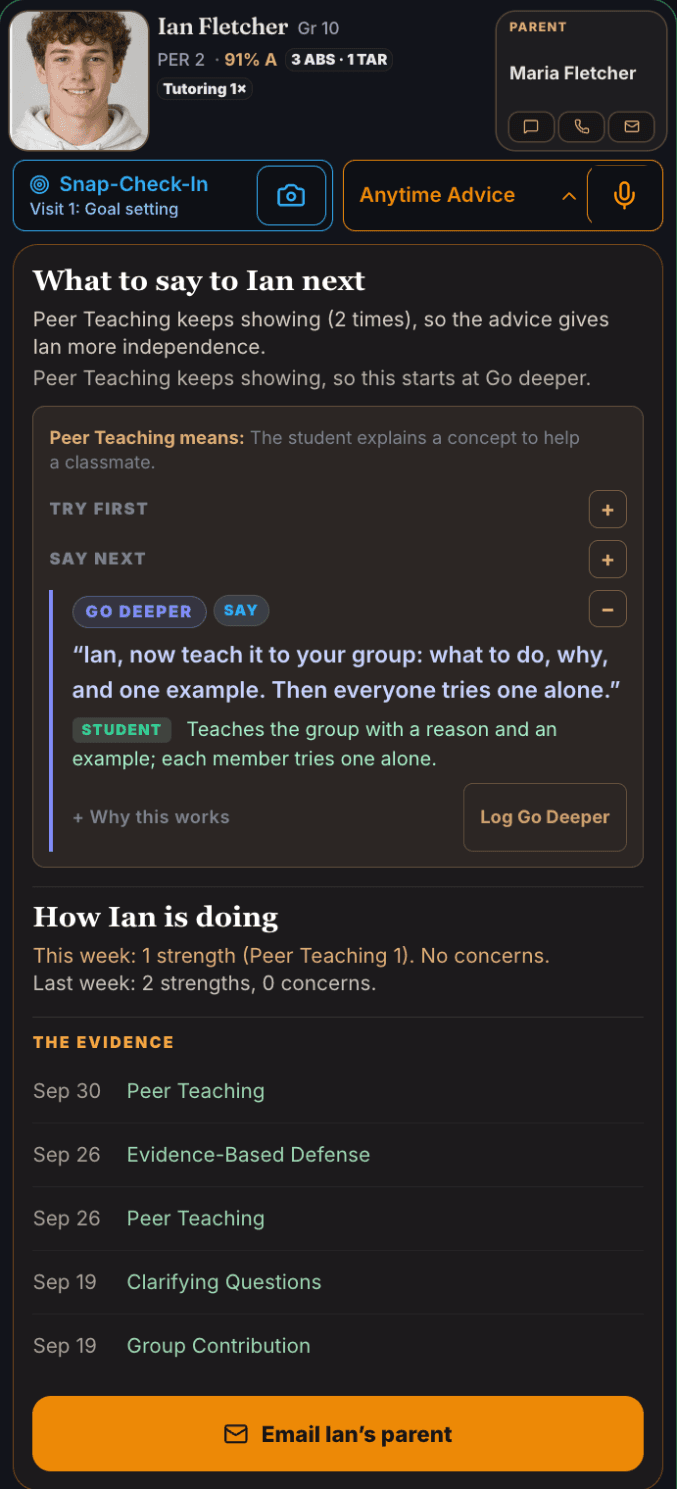
    Not one slogan. A ranked sequence, right on the card while you are still standing there. The first move is open; the other two are one tap — or say “show me the rest.”

    The coaching moment as it renders on the real card: the heading Coaching Moment · Explains Reasoning, an orange TRY FIRST pill, a blue Teacher chip with the exact words to say out loud, the one-line reason it works cited to Mueller & Dweck (1998) process praise, a “Show the rest — or say show me more” control, and the Hattie elaboration and organization effect size.
    The coaching on the card, in the room, while the teacher is still working with the student.

    Try first

    Noah, you explained every step instead of jumping to the answer. That is showing your reasoning — show your steps again whenever a problem gets hard.

    Praise changes what a student does next only when the strategy has a name they can carry and a named occasion to use it again — a bare compliment leaves nothing to repeat. Mueller & Dweck (1998) process praise

    Say next

    Noah, that is one route to the answer. Now show me a second way to reach the same answer.

    A second explanation cannot be pulled from memory — the student must rebuild the reasoning from the start, and that rebuilding is where the learning actually happens. Chi et al. (1994) self-explanation

    Go deeper

    Send the student to teach a partner with one rule: explain each step and why it works, so the partner can solve the next problem alone.

    Explaining each step to another person forces every step into words, exposing exactly which steps were understood and which were held loosely. Rosenshine (2012)

That is the whole loop, for one student, without stopping your lesson. See all 24 indicators and their coaching moves →

Switch on Agentic Angel when you’re ready to coach. It hears the moment, names exactly what you saw, and shows you the coaching on the card — then remembers it all year.

The top of a real Teacher Supreme student card: Susie Miller's photo, grade, ID and period; Susie's parent David Miller a tap away; attendance, late work, grade and citizenship chips; and the Log interaction control showing its three ways in — Tap, Hold, or let the student’s name be heard twice as you talk — beside the Behavior and Academics toggle
This is the real card. Log interaction is the whole control: tap a button, hold for a memo or a reminder, or just keep talking — the card comes up on its own, the way step one explains above.
🔒

Private by design. Agentic Angel listens only when you switch it on, and stops the instant you say so. It starts when you tap it and only then — your bell schedule organizes your periods, and the microphone answers to you alone. Walk-around, group work, or mid-lecture: the moment is always your call. Read the full privacy policy →

🎙️

Tuned to your voice, on any phone. Read three short sentences once and the microphone learns your speaking pitch — four numbers stored on your own phone, no recording made, deleted in one tap. From then on a card only rises when the voice was close to the phone and consistent with yours, so a student across the room saying a classmate’s name doesn’t raise cards. And it can only ever remove a wrong trigger, never one of yours — skip the setup and everything still works.

Mishears land on your roster, not on a guess: say a name and it matches by sound against the students actually in the room, and when two students could both fit, it asks you instead of choosing. On iPhone — where no browser allows live listening — hold the button and the words are made on the phone itself: one download on your home wifi, then it works even with no signal, and what you say is never sent anywhere.

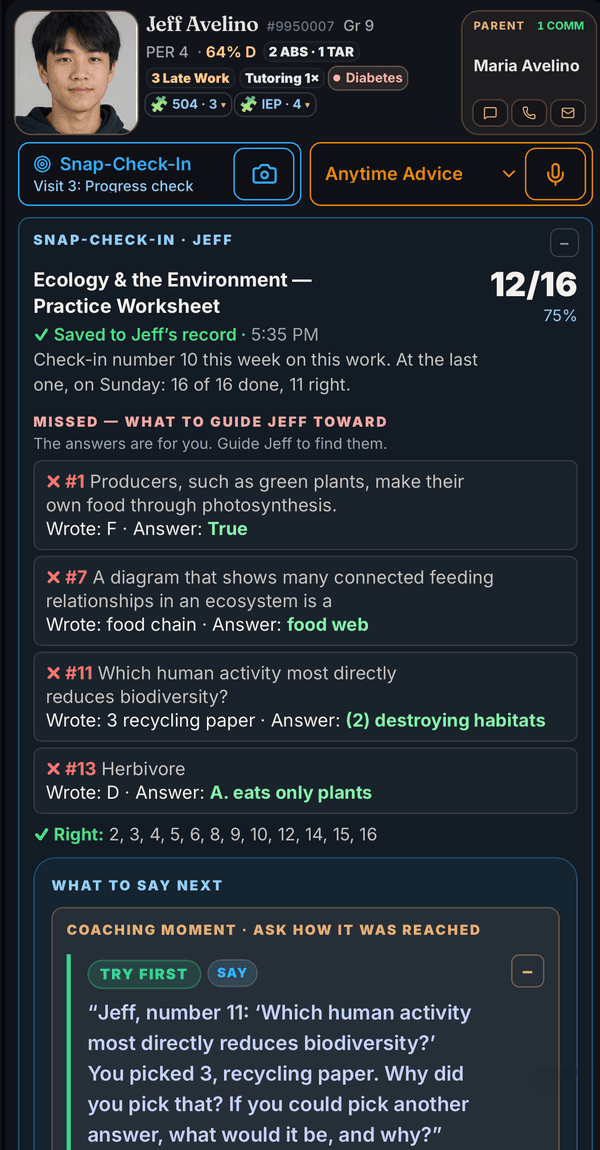
🧠 And it remembers. Nothing reaches a student’s card on its own. You say what you saw — “Noah explained how he got there before he wrote the answer” — and that becomes one dated interaction filed under one of the 24 indicators, or a memo you read and approve before it saves. The card is the record of what you logged, and that record is what makes a student’s growth visible all year.

Why it works: catching and naming what a student does well — not just correcting what’s wrong — is among the highest-impact moves in the feedback research. The naming is the working part. “Good job” tells a student the last thing went well; “you showed your steps instead of jumping to the answer” tells them which move to make again on the next problem, and on the one after that. Mueller and Dweck gave 412 fifth graders the same score and changed six words of praise: told they must be smart, 67% then chose an easier task; told they had worked hard, most chose the harder one.

All 24 indicators, with the full coaching for each →

Build stronger relationships

Not another points app

Your gradebook tracks grades. ClassDojo counts points and messages parents. Neither one shows you the research-backed words to say back to Sophia, and neither keeps what you actually noticed in the words you said it in. Teacher Supreme is the memory layer — private to you, searchable when you need it.

It also aims your attention at the students who grow when someone notices them. Half of the 24 indicators are strengths to catch and feed — explaining reasoning, helping a tablemate, staying with a hard problem. The other half are early signs to catch before they harden — the head down, the blank page, the third missing assignment in a row. So most of what you log is positive on purpose, and the quiet student who is slipping away without making a sound stops being invisible.

Here is what that looks like. Third-period biology, week six. Sophia has not spoken in class since September. Today Sophia raises a hand and says the root tip on the slide has more dividing cells at the growing end. You tap Sophia’s name and say what you saw, and Teacher Supreme shows you the research-backed words to say back, on that student’s card: “Sophia, you used what you saw under the microscope as your reason. That is arguing from evidence — do that again the next time somebody asks you how you know.”

That is the part a points app cannot do. A point is a number in a column: it does not say what Sophia did, it does not name the skill, and it gives Sophia nothing to repeat on purpose. Sophia heard the thing she actually did, heard what it is called, and heard when to use it again. That is what being seen actually means — not a sticker, a sentence about your own thinking. The research on why that changes what a student does next is directly below.

0.52

Hattie’s current synthesis puts the association between a strong teacher-student relationship and achievement at about 0.52 — measured by whether the two travel together, not by a trial. It means students who feel known tend to do better. It is not a gain anyone is promised.

Stay positive

When teachers raised their own rate of praise over reprimands, students were on task more and disrupted less (Cook et al., 2017; Caldarella et al., 2023). No study found a target number to hit, and the popular 4:1 and 5:1 rules have no evidence behind the number itself (Sabey, Charlton & Charlton, 2019). Teacher Supreme shows you your real balance, and when a student’s slips it names that student and shows you a positive to use.

The balance card on the Daily Recap screen: the heading “Your balance today”, a large 4 : 1, and the line “32 positives to 8 corrections — a ratio of 4 : 1.” with no target or grade shown.
Your own balance, on the Daily Recap screen. It reports — there is no grade, no streak, no target, and no child is ever ranked.
See the science & sources

Raise student achievement

The research library

The 24 things master teachers look for

A full classroom during independent practice, seen from above: six tables of students each doing something worth noticing — one explaining a paper step by step, one bent over hard work, one helping a classmate — while Mr. Morris stands in the middle aisle taking it all in, phone glowing green in his lowered hand.

New teachers often say “Good job!” or “Keep it up” — a kind word, but a generalized one. The research is unusually specific about what that costs. Mueller and Dweck (1998) gave 412 fifth graders identical scores and changed six words: half heard “you must be smart at these problems,” half heard “you must have worked hard at these problems.” Offered a choice right after, 67% of the students praised for being smart took the easier task instead of the one they’d learn more from — and after a setback they quit sooner and finished below where they had started. The students praised for the work kept going and finished higher. After 35 years in the classroom, James Morris will tell you nobody hands a new teacher those sentences. Teacher Supreme does, in the moment they are needed.

Mueller & Dweck (1998) — the study, and the sentences it produced →

What we do not claim:no trial has tested whether Teacher Supreme raises achievement. We have not run one, and we will not imply otherwise. The research above is the reason this was built the way it was — it is not a measurement of the product. The evidence, and how strong it actually is →

Cognitive Investment

Reinforce these

  • Explains Reasoning
  • Summarization
  • Sustained Focus
  • Thoughtful Questioning
  • Evidence-Based Defense
  • Transfer Strategies

Active Participation

Reinforce these

  • Peer Teaching
  • Group Contribution
  • Peer Collaboration
  • Clarifying Questions
  • Discussion Participation
  • Help Seeking

Cognitive Withdrawal

Catch these early

  • Task Avoidance
  • Low/No Effort
  • Rushed Work
  • IDK Response
  • Intellectual Guessing
  • Delayed Response

Off-Task Behavior

Catch these early

  • Disrupts Others
  • Side Conversation
  • Device Misuse
  • Copying Work
  • Wandering / Daydreaming
  • Defiance / Back Talk

Cognitive Investment

6 of 24

Signs a student is genuinely thinking, not just complying.

Explains ReasoningSummarizationSustained FocusThoughtful QuestioningEvidence-Based DefenseTransfer Strategies

Active Participation

6 of 24

Engagement you can see and hear, not just paper turned in.

Peer TeachingGroup ContributionPeer CollaborationClarifying QuestionsDiscussion ParticipationHelp Seeking

Cognitive Withdrawal

6 of 24

The quiet ways a student checks out of the thinking, even while staying in their seat.

Task AvoidanceLow/No EffortRushed WorkIDK ResponseIntellectual GuessingDelayed Response

Off-Task Behavior

6 of 24

The behaviors most teachers already catch — now with the exact word for what’s happening.

Disrupts OthersSide ConversationDevice MisuseCopying WorkWandering / DaydreamingDefiance / Back Talk

See all 24, exactly as the app listens for them ↓

Cognitive Investment

  • Explains Reasoning (d=0.7)
  • Summarization (d=0.8)
  • Sustained Focus (d=0.4)
  • Thoughtful Questioning (d=0.5)
  • Evidence-Based Defense (Argumentation with evidence · Osborne, Erduran & Simon (2004) · no published effect size)
  • Transfer Strategies (d=0.9)

Active Participation

  • Peer Teaching (d=0.5)
  • Group Contribution (d=0.6)
  • Peer Collaboration (d=0.6)
  • Clarifying Questions (d=0.5)
  • Discussion Participation (d=0.8)
  • Help Seeking (d=0.4)

Cognitive Withdrawal

  • Task Avoidance (Academic task avoidance · Liao et al. (2013) · no effect size)
  • Low/No Effort (Behavioral disaffection · Skinner et al. (2009) · no effect size)
  • Rushed Work (Speed–accuracy tradeoff · Heitz (2014) · no effect size)
  • IDK Response (Learned helplessness · Dweck & Reppucci (1973) · no effect size)
  • Intellectual Guessing (Rapid-guessing behavior · Wise & Kong (2005) · no effect size)
  • Delayed Response (Latency to initiate tasks · Wehby & Hollahan (2000) · no effect size)

Off-Task Behavior

  • Disrupts Others (Classroom disruptive behavior · Rayfield et al. (1998) · no effect size)
  • Side Conversation (Off-task verbal · BOSS observation system · no effect size)
  • Device Misuse (Digital distraction · Ravizza et al. (2017) · no effect size)
  • Copying Work (Academic dishonesty · Whitley (1998) · no effect size)
  • Wandering / Daydreaming (Off-task passive / mind-wandering · Unsworth & McMillan (2017) · no effect size)
  • Defiance / Back Talk (Noncompliance · Kalb & Loeber (2003) · no effect size)
See every definition, example & effect size →

Lives in the app under More → Observation Library — included free from your first sign-in.

Every one of them traces to a named, peer-reviewed source. Thirteen carry John Hattie’s published effect sizes — associations, not promised gains. The other eleven, the off-task and disengagement ones, name the research that defines and measures the behavior instead: the observation system school psychologists code with, validated teacher rating scales, published measurement studies. An effect size is one kind of evidence, not the only kind. One tap opens the full list.

You describe what you saw in your own words and Teacher Supreme names it back for you — you say “that student backed up their point with the tariff numbers from the reading,” it names that Evidence-Based Defense, and shows you the sentence to say to that student before the bell. That is professional development arriving in the ten seconds you can actually use it, instead of in a Thursday meeting in March.

Know what to say next

Your in-the-moment mentor

A veteran mentor, right in the moment

The bell has rung and Mr. Morris stands at the open doorway, high-fiving a student as the class files past into the hallway — his clipboard held level in his other hand with his phone lying screen-up on it, screen glowing soft green with the round he just walked.

Here’s what turns logging into growing: every one of the 24 indicators carries a Coaching Moment — not just the word for what you’re seeing, but what to say and why, right then. It is the veteran teacher down the hall standing at your elbow: you saw a student check their own answer before turning the page, and instead of leaving it at “nice work,” you have the words that make them do it again on the next problem \u2014 and you learned the name for what you were looking at while you were looking at it.

Because the words you say matter more than they look. Tell a student they’re smart, and the next hard problem takes that away. Name the process they used — the steps, the strategy, the staying-with-it — and they hold a move they can reach for whenever it gets hard again. Every script below is built that way.

One of the 24 · what the app shows you

Sustained Focus

The student stays locked in on a task for a long stretch.

Concentration, persistence & engagement · d ≈ 0.4 · Hattie

Looks / Sounds Like

On task for 10+ minutes, quietly working — fifteen minutes straight with no redirection; returns after a small distraction; deep concentration.

Coaching Moment

Name the stretch and what it bought: "You stayed with that twelve minutes straight — that's what got you through the hard part." Then set the next checkpoint with the student — work to a set time, then show one thing — so the focus has somewhere to go.

Try first

Say You stayed with the task after it got hard instead of setting it down. That is staying with it — stay with the task again the next time the work starts to drag.

Tying the outcome to the student’s own persistence — with a name and a named next occasion — makes the effort repeatable; praise for being focused is not a strategy. · Mueller & Dweck (1998) process praise

Say next

Do Give the next stretch a finish line with a real number in it: work until ten fifteen, then show me one thing you figured out.

A checkpoint the student can see turns an open-ended task into a reachable target, and the show-me step reads their understanding without stopping the work. · Black & Wiliam (1998) formative assessment

Go deeper

Say What exactly did you do to stay with the task when it got hard? Name that move out loud — it is yours to use on the next hard task.

A student who names their own focus strategy lifts the lesson from this one task to how they manage themselves — the level that carries into the next class. · Hattie & Timperley (2007) feedback levels

One of the 24 · what the app shows you

Task Avoidance

The student avoids starting or engaging with the task.

Academic task avoidance · Liao et al. (2013) · no effect size

Looks / Sounds Like

Sits at the desk doing nothing; delays; off-task before beginning.

Coaching Moment

Shrink the first step to almost nothing: "Just the first line — I'll be back in one minute to see it." Starting is the whole intervention; the rest usually follows on its own.

Try first

Say Just write the first line — that is all I want right now. I will be back in one minute to see that line.

The block is almost always starting, not the work itself — a seconds-sized request removes the reason to stall, and the named return time makes it a commitment. · precorrection (Colvin, Sugai & Patching, 1993)

Say next

Do Before the next task begins, say out loud what starting looks like — materials out, name on the page, first line within two minutes — then walk past that desk inside the first minute.

Naming what starting looks like before the task heads the stall off, instead of reacting to a stall that has already set in and now must be undone. · precorrection (Colvin, Sugai & Patching, 1993)

If it persists

Do Ask for two or three quick things the student will almost certainly do — hand me that paper, read me the title — then make the harder start request immediately after.

A short run of easy yeses builds momentum, so the harder request lands on a student already moving instead of one starting from a dead stop. · high-probability request sequences (Mace et al., 1988)

See all 24 — every indicator with its Coaching Moment →

Your In-the-Moment Mentor, included in Basic: the Coaching Moment appears the instant the app recognizes what it heard — right beside the glowing Log button, so you can say the next best thing while the moment is still alive. Anyone can read the library; Basic shows you the line in the moment.

MD
Marcus D. · P3
Parent
Lisa Delgado
🎤 Heard you — best match glowingMy grid

Say “log it” to confirm — or tap the glowing button.

Coaching moment Ask for a second route to the same answer: "That's one way — what's another way to look at it?" Then have the student walk a partner through the thinking step by step, not just the answer.

Explains Reasoning
Summarization
Sustained Focus
Thoughtful Questioning
Evidence-Based Defense
Transfer Strategies
Try first

“Marcus, you explained every step instead of jumping to the answer. That is showing your reasoning — show your steps again whenever a problem gets hard.”

Praise changes what a student does next only when the strategy has a name they can carry and a named occasion to use it again — a bare compliment leaves nothing to repeat. · Mueller & Dweck (1998) process praise

Say next

“Marcus, that is one route to the answer. Now show me a second way to reach the same answer.”

A second explanation cannot be pulled from memory — the student must rebuild the reasoning from the start, and that rebuilding is where the learning actually happens. · Chi et al. (1994) self-explanation

Go deeper

Send the student to teach a partner with one rule: explain each step and why it works, so the partner can solve the next problem alone.

Explaining each step to another person forces every step into words, exposing exactly which steps were understood and which were held loosely. · Rosenshine (2012)

In the app the first move is open and the other two are one tap — or say “show me the rest”.

The evidence: a 2020 meta-analysis of 435 studies and more than 61,000 participants (Wisniewski, Zierer & Hattie) — far larger than the 131-study review that had been the benchmark — found feedback overall averages an effect size of 0.48 — above the 0.20 that counts as large in randomized school trials (Kraft, 2020), whose bar is drawn from trials measured on standardized tests. Feedback that tells a student what was right or wrong and adds information about the process and about managing their own learning reaches 0.99, while feedback that only rewards or reprimands, carrying almost nothing about the task, sits at 0.24. Every Coaching Moment follows that higher-evidence pattern: specific praise, plus a concrete next step. Formative assessment built the same way shows similarly strong effects (Black & Wiliam, 1998). It is, in effect, in-context professional development: expert teaching vocabulary, delivered exactly when it is needed.

Source: Wisniewski, Zierer & Hattie (2020); Black & Wiliam (1998) — see the full evidence →

Grounded in the research behind the 24 — John Hattie’s Visible Learning and the classroom frameworks each indicator draws on — so the move you’re handed rests on evidence, not a hunch.

A tip from the classroom: many teachers clip their phone to a clipboard — it looks professional, stays in your hand instead of on a desk, and gives you natural cover to glance, log, or snap a photo while you circulate. Not required, just handy.

An iPhone clipped to a teacher's clipboard, showing a Teacher Supreme student card for demo student Susie Miller: a voice suggestion reading 'Sounds like Peer Teaching' with 'say log it to confirm — or tap the glowing button', a Coaching Moment tip ('Pair strategically — teach them the way you just explained it to me'), and nine suggestion buttons with Peer Teaching glowing
On the clipboard: the real Class screen mid-moment — the teacher said “peer teaching,” the right button is glowing, and the Coaching Moment says what to do next.

Remember the little things

The memory layer

Remember what matters to a student — and show them you did.

Two scenes. Without it: Mr. Morris at 7 p.m., alone at a desk buried in papers and sticky notes — a whole roster's worth of details carried in one tired head. With Teacher Supreme: Mr. Morris kneels at Rumi's desk asking 'How's your brother doing? Cast off yet?' — remembered without being asked, because it was logged the day Rumi mentioned it. Hattie's synthesis puts the association between a strong teacher-student relationship and achievement at about d = 0.52 — correlational research, so an association rather than a promised gain.

You find out at a desk that Jeremy’s brother is in the hospital. That Susie made the cheer squad. That someone has a make-up test to sit before the term ends. Right now all of it goes in your head, and your head is already full.

Two weeks later, it is the difference between walking past that desk and stopping at it: “How’s your brother doing?” Or, to the one just back after two weeks out sick: “Good to have you back — here’s how we’ll catch you up.” Thirty seconds, and a student learns they were missed. That is what a memory is for.

Hold the button. Say it, or set it.

Take a memo keeps your words on that student’s card — type it when the room is quiet, tap the mic when your hands are full. Remind me puts a day on it. And your counselor, principal and nurse sit right underneath — named by their role, once you have added them: a tap to call, or a tap to open an email you write and send yourself.

The sheet that opens when a teacher holds Log interaction on Susie Miller's card: Take a memo, Remind me, then a row each for Counselor Ms. Alvarez, Principal Dr. Bell and Nurse Mr. Osei, every one with its own Call and Email button, above the line “Nothing sends until you read it.”
The real sheet, on a real card. Nothing sends until you read it.
The memo box on Susie Miller's card, headed “Take a memo”, with the prompt “Type what you saw — or tap the mic and say it”, a microphone button inside the box, the line “Saved to Susie Miller's paper trail — timestamped, FERPA-shielded”, and Cancel and Save buttons.
Same box either way — the keyboard stays down until you ask for it.

It comes back on the day you picked.

Waiting at the top of your class list, before the bell. Tap Done when it happens — that logs the moment on the student’s card — or Tomorrow when the day got away from you. Nothing you miss disappears; it tells you how late it is and waits.

The reminders list on the class screen: Jeremy Alvarez, two days late, have Jeremy come in and take his make-up test; Period 3 Biology tagged CLASS, due today, video picks up at 22:13 and teams 4, 5 and 7 present; Susie Miller, due today, sees the nurse for medicine. Each row has a Done button and a Tomorrow button.
Your own list, at the top of the class screen.

Not everything you carry is about a student.

The video stopped at 22:13. Teams 4, 5 and 7 still owe a presentation. The read-aloud reached the bottom of page 94. When a period ends, Teacher Supreme asks the one question worth asking in that moment — anything to remember for tomorrow? — and it is waiting for you when that class walks back in.

And when it is good news, send it to the office.

The quiet one explained their reasoning to the whole table. Another made the team. A third apologised without being asked. A positive referral is real practice, not a nice idea: the student goes to the office to be congratulated and calls their own parent from there. When teachers raised their own rate of praise over reprimands, students were on task more and disrupted less (Cook et al., 2017; Caldarella et al., 2023) — and no study found a target number to hit, which is why the popular 4:1 and 5:1 rules have no evidence behind the number itself (Sabey, Charlton & Charlton, 2019). A positive referral is that research turned into a phone call the student makes themselves.

The words are already on the card, in your handwriting, with the date on them. Call the counselor in one tap, or open an email and copy them in yourself.

The research behind staying positive →

Remember what matters

The student card

One card. The whole student.

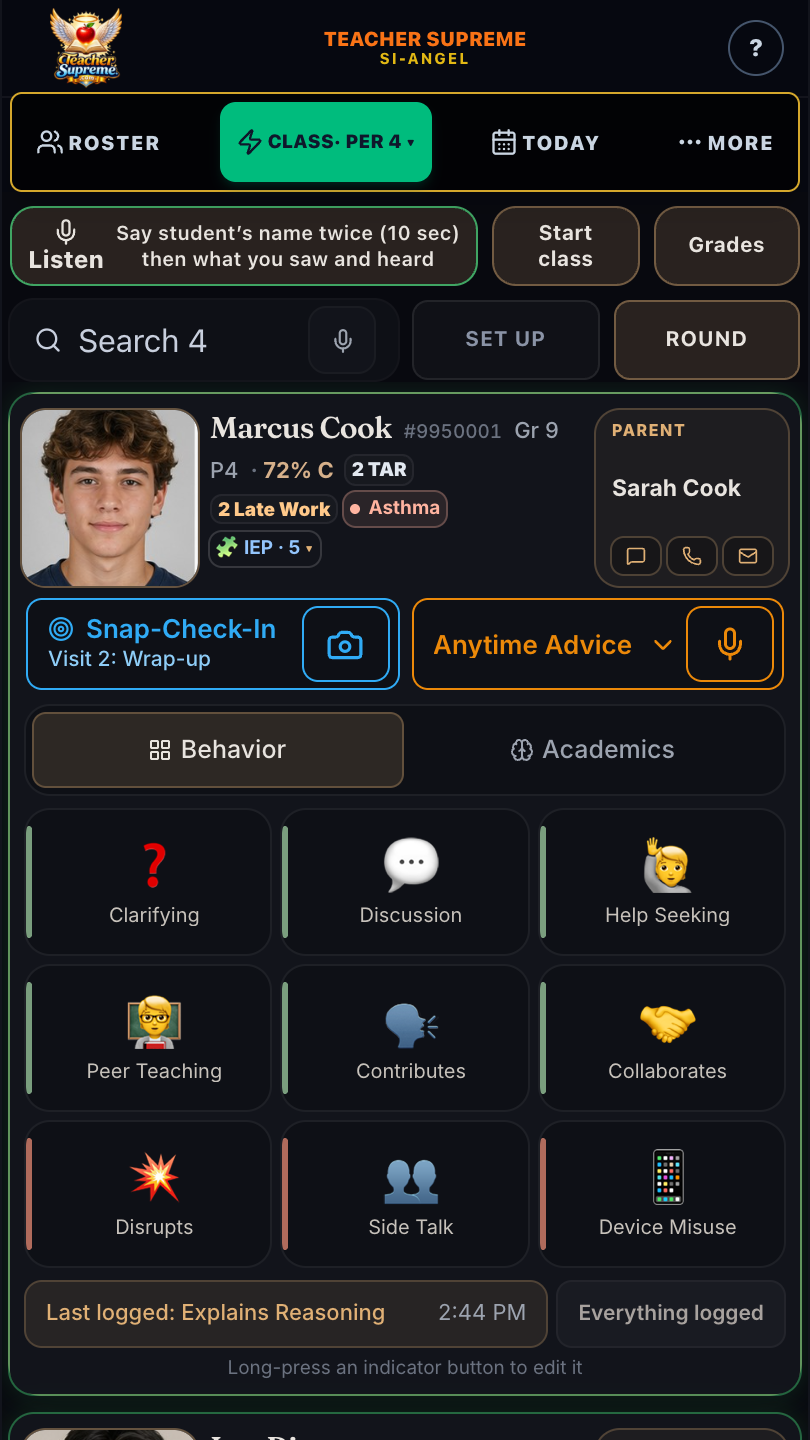
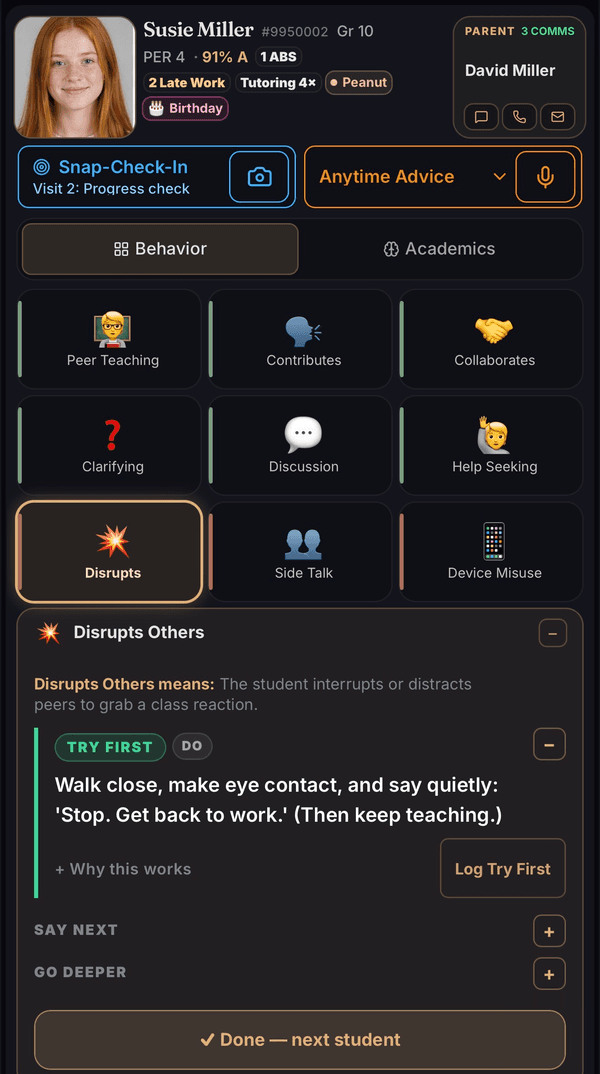
This is Susie’s card, exactly as it renders in the app today — the photo, the parent a tap away, attendance, late work, current grade, citizenship, and how often home has been reached. Below that: the alert every teacher must never miss, shown in red before anything else. Then two nine-button log grids — Behavior and Academics. Tap to log. Long-press to edit. Every tap time-stamped.

Teacher Supreme student card for demo student Susie M. with the Behavior grid selected: photo, parent contact tile, attendance and grade chips, a red allergy alert row reading Allergy alert - Peanuts, and nine behavior buttons
The Behavior grid — and the peanut-allergy alert that stays visible on the card, every day, without anyone asking.
The same Teacher Supreme student card with the Academics grid selected: nine academic buttons: Low/No Effort, Rushed Work, IDK Response, Questioning, Evidence, Transfer, Reasoning, Summarization, and Focus
One tap on Academics — same card, the thinking side: research-ranked indicators from the learning-science library.

Inside the card

Every row earns its place.

Top to bottom, here is what each part of the card does for you — and why it lives where it lives.

Photo · name · parent tile

The top of Susie M.'s card: photo, name, grade and period, and the parent tile with one-tap text, call, and email

The face and the family, together. A tap on the parent tile brings up text, call and email side by side, with the contact already filled in — between classes, that is the difference between reaching a parent and meaning to.

Why it matters: When something happens third period, home hears about it before the bell.

The chip strip

The chip strip: attendance, late work, current grade, citizenship, and the came-to-you count on one line

Attendance, late work, current grade, citizenship, and a count of how often they've come to you — tutoring, office hours, a question after class — pulled onto one line.

Why it matters: The context you'd normally open three tabs for, read in one glance while the student is standing in front of you.

Log interaction bar

The Log interaction bar — tap to type, hold for a memo, a reminder, or a staff note, double-tap for the camera — beside the Behavior/Academics toggle

Tap it to type a quick note. Hold it and choose: a memo in your own words, a reminder that comes back on the day you pick, or a note to your counselor, principal, or nurse. Double-tap and the camera opens to snap the student's work into their file.

Why it matters: Log what a student just did while you are still working with the student \u2014 one tap, or one sentence out loud.

Alert chips — allergies, IEP, the human stuff

The eight alert chip types the card draws from — it shows the three most important at a time: red medical allergy alert, amber missing IEP signature, neutral IEP accommodations and behavioral note, and gold chips for birthday, honor roll, club soccer, and a new baby sister at home

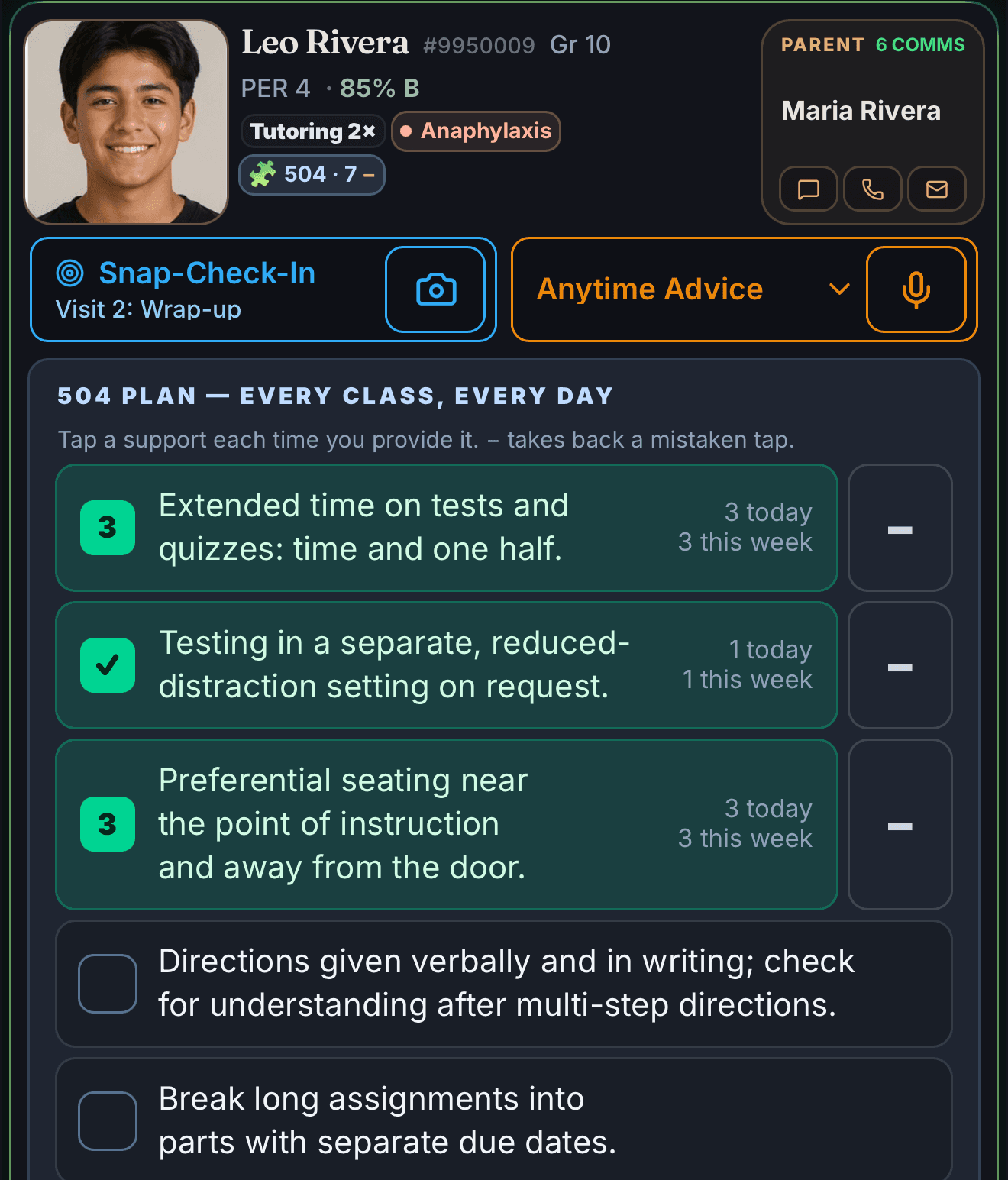
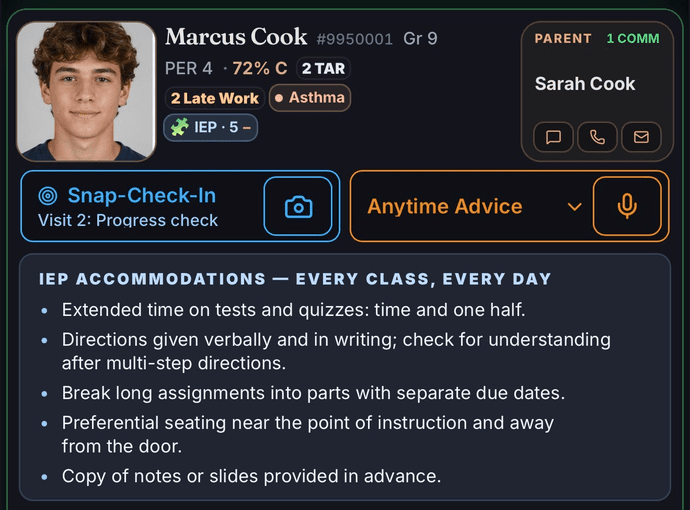
Medical alerts show in red and never hide. IEP/504 accommodations sit one glance away — on Plus, you can snap the accommodations page of the plan and the supports load themselves (names are blacked out on your phone before anything uploads). Birthdays and wins surface here too.

Why it matters: The peanut allergy is not on page 4 of a binder. It is on the card, every single day.

Two 3×3 grids — Behavior and Academics

The 3×3 Behavior grid — nine one-tap indicator buttons, positives on the right

Eighteen research-ranked indicators, positives always on the right. Tap to log; long-press to see the research or swap a button.

Why it matters: A full observation logged in under a second — that's the difference between a system you use and a system you abandon in October.

Your positive-to-corrective balance, quietly kept

When a student's balance dips below roughly two logged positives per correction, a quiet suggestion appears at the top of your class screen naming one student and one thing to try — for example: “You have logged four corrections and no positives for Marcus this week. Marcus started the warm-up without being asked on Tuesday. Say that to him today.” When teachers raised their own rate of praise over reprimands, students were on task more and disrupted less (Cook et al., 2017; Caldarella et al., 2023) — and no study found a ratio to chase, which is why the popular 4:1 and 5:1 rules have no evidence behind the number itself (Sabey, Charlton & Charlton, 2019). What you get here is your own pattern, visible.

Why it matters: A helpful suggestion when you want one — never a judgment.

The portfolio

A grade is a number. Now you can show the work behind it.

A quiz says 43. It does not say that this student taught a tablemate on Tuesday, stayed with a hard problem on Thursday, and has asked sharper questions every week for a month. Your logged interactions build into exactly that record — a timeline of real interactions you can open at grading time, bring to a conference, or hand to a counselor.

So when report cards come around and you’re looking at a borderline grade, you are not deciding from memory and instinct. You have weeks of evidence about how this student worked, grew, and helped others — and the call stays entirely yours. That is a kind of power a gradebook alone never gave you: the student who worked gets seen in the grade.

One camera button

Your camera does the paperwork.

One Snap Photo button on your Roster, seven kinds of paperwork it erases. You take the photo; the app does the typing.

  1. Your roster or student information system

    the whole class, parent contacts and all

  2. The attendance screen, a paper sheet — or the office’s weekly or monthly grid

    present, absent, tardy, excused and truant, every day filed to its own date

  3. Your seating chart — from your student information system, a printout, or one you drew

    who sits where, on your class screen and in every sub plan

  4. Your gradebook screen

    grades and missing work on every student’s card

  5. An IEP or 504 accommodations page

    the supports on that student’s card, names blacked out on your phone first

  6. A finished worksheet

    a score, the skill to reteach, and an extension problem for you to hand whoever finished early

  7. The nurse’s health list — an email, spreadsheet, or printout

    the red medical alert on the right student’s card, visible every day

Roster in one snap
A photo of your roster, seating chart, or student information system and your class is in — students, parent contacts and all.
Attendance from any sheet — or a whole month of it
Snap the attendance screen or a paper sheet — present, tardy, and absent read for you, and you confirm by voice or tap. If the sheet is dated, the app notices and asks whether to log it for that day — Friday’s paper sheet, photographed Monday, goes down as Friday. And if daily snaps aren’t your rhythm, photograph the office’s weekly or monthly grid at the end of the week instead: one photo, every student, every day filed to its own date — excused, truant, and the district’s own codes included, nothing saved until you confirm.
Grades without retyping
A photo of your gradebook screen or printout and current grades and missing work flow onto every student’s card.
IEP & 504 accommodations, finally at your fingertips
Snap the accommodations page of a student’s plan. Your phone blacks out the student’s name, ID numbers, and birthdates before anything is sent — you see the blacked-out page yourself — and the accommodations land on that student’s card, visible at the moment of teaching and woven into parent drafts and reports. No more digging through a PDF nobody opens after week one.
Medical alerts from the nurse’s email
When the nurse sends out the health list — an email, a spreadsheet, a printed sheet — snap it. The app reads the names and conditions, you confirm each match, and the red medical alert lands on the right student’s card, where it stays visible every single day.

Getting started

Setup is one question.

Right after you tell the app who you are, it asks one thing: add your class roster — one photo of your roster, seating chart, or student information system — or put in your bell schedule so it knows when each period starts and stops. A/B days, Wednesday schedules, and minimum days all work. Or skip both and just look around — you can do either anytime later.

The setup screen
Teacher Supreme onboarding, step 2 of 4, titled 'Set up your classroom?' — two option cards, 'Add your class roster' (one photo of your roster, seating chart, or student information system) and 'Add your bell schedule' (A/B days, Wednesday schedules, and minimum days all work), with a 'Skip for now' link below
Step 2 of 4 of real onboarding, captured from the shipping app — your roster and schedule save to your account.

Plus · Snap-Grade

Walk the room. Grade as you go.

One photo, five things back: Mr. Morris photographs Rumi's worksheet with his phone — marks appear on the screen. Below: Score (every item marked on the photo), The pattern (three misses, one mistake — named), The whisper (what to say, under 20 words), Extend (for the student who aced it), Reteach (for the student who struggled). From a real live test: it caught three wrong answers sharing one misconception.
A real grade-out — this exact worksheet, score, and coaching came from one photo in live testing.

The card you met up top carries a gold Snap-Grade row — on Plus, tapping it goes to work. Photograph the worksheet on the desk, and before you reach the next row of seats you have: the score, every item marked right or wrong, the one skill to reteach, and a whisper of coaching for exactly this student — plus a harder problem to hand the student who finished early and a scaffolded reteach to hand the one who didn’t get it. Both come back with the same photo, for you to use with them — Snap-Grade hands work to you, not to a student’s device. One photo. All of it at once.

The same Teacher Supreme student card, now with the gold Snap-Grade row visible between the red allergy alert and the nine behavior buttons
The same card — now with the gold Snap-Grade row. That one row is what Plus adds.

Privacy, by design: Teacher Supreme never puts the student’s name in the AI prompt — the model sees the worksheet, not your roster. The name is added back after grading.

Which features, which plan

Basic helps you remember every student. Plus makes you a better teacher.

Basic is $5 a month per class. Plus is $10 a month per class. Each class holds up to 50 students, and you pay for the classes you actually teach.

Basic · $5 a month per class

The card and everything on it: tap and voice logging, same-day parent email, daily summary, student PDFs, CSV export. Plus the part that catches what you would have missed — trend charts, and an alert when a student’s pattern shifts before you would have caught it yourself.

For a principal: documented, FERPA-safe interactions for every student, without asking teachers to fill anything in — and research-backed feedback practice coached live in the room, not once a year in a workshop.

Plus · $10 a month per class

Everything in Basic, and then the two things that eat a teacher’s evening. The words: In-the-Moment Mentor shows you the research-backed phrase on that student’s card while you are still working with the student. The paperwork: Snap-Grade with reteach and extension, weekly parent reports written from your logs, snap your whole gradebook, snap IEP/504 accommodations onto the card, snap the attendance screen, substitute mode, conference packets, lesson ideas from your own logs, and “who needs attention?” on demand.

For a principal: accommodations visibly in front of the teacher at the moment of teaching, and a conference packet that already exists.

See full pricing →

Why it works this way

The smart way to use AI in a classroom.

Most AI built for schools is trying to do the teaching. It writes the lesson, grades the paper, drafts the message — and then asks the teacher to check its work.

Teacher Supreme is built the other way round. It refuses to automate the act of teaching. You do the noticing. You do the judging. Agentic Angel does the remembering.

  • Nothing is written until you confirm it — by tap or by voice.
  • It never decides whether a moment was positive, a correction, or neutral. It offers a read; you rule.
  • When it is unsure what it heard, it says so and shows you your own words instead of guessing.
  • Your sentence is kept beside the label, so the record is what you saw and not a summary of it.

The judgment stays where thirty-five years of classroom experience already lives. The machine carries what a human brain was never built to hold — thirty names, five periods, more quiet students in a day than any memory can hold.

That is what teachers actually need from AI. It is how this should have been built for education from the start.

Simple, class-based pricing

$5 per class.

Basic is $5 a month per class. Plus is $10 a month per class. Each class holds up to 50 students, and you pay for the classes you actually teach.

Monthly price by number of classes, for each plan. Basic is $5 a month per class. Plus is $10 a month per class. Each class holds up to 50 students, and you pay for the classes you actually teach.
ClassesBasic$5 per classPlus$10 per class
1 · 50 students$5$10
2 · 100 students$10$20
3 · 150 students$15$30
4 · 200 students$20$40
5 · 250 students$25$50
6 · 300 students$30$60

50 students per class — the cap scales as you add classes. Beyond 6 classes, it’s +$5 per class. Start with 4 free weeks, no card to start. Pay 10 months up front, get the full 12. Cancel anytime.

Compare every feature, side by side →

Student privacy

FERPA-safe by design — privacy built into the code, not just promised.

  1. 01

    On your phone

    Printed names on a photographed sheet are blacked out before anything uploads. You see the blacked-out page yourself.

  2. 02

    What the AI reads

    Everything you type or say arrives as codes. A name becomes STU-001 on your phone first, and the code is what travels.

  3. 03

    In the cloud

    Records are encrypted, and real names are restored only on your own signed-in device.

01
On your device
Student full names, photos, and parent contacts are stored only on your phone — never on our servers.
02
When the AI helps
The AI never sees student names in anything you type or say — every name is swapped for an anonymized token before anything reaches it, and restored only on your device. Photos go further than you might expect: in the normal case your phone replaces your students’ names with codes in the image itself before an attendance sheet, gradebook page, or nurse’s list is sent — and if it can’t, nothing is sent until you decide. A roster photo is the one flow sent as captured (there’s no roster on the device yet to match against). Every photo is read, then discarded — not stored by our servers, and our AI provider’s paid-API terms prohibit training on it.
03
In the cloud
Your backup holds only a first name and last initial — never a full name or parent contact. Encrypted at rest (AES-256) and in transit, with every teacher’s data sealed off from every other.

Even in photos

Your attendance photo never shows the AI a name.

When you snap an attendance sheet, your phone reads it and replaces every student’s name with a code — S1, S2 — right inside the picture, before anything is sent. The AI reads “S1 — absent” and never learns who S1 is; your phone puts the real names back. And if your phone can’t hide a name confidently, nothing is sent until you decide — retake it, or send it as-is. Worksheets and IEP/504 pages are scrubbed on your phone the same way.

Your students’ full names stay on your phone — the only exceptions are ones you choose: a report you send to a parent, or a photo you ask the AI to read.

See exactly how it works →

Ten privacy questions, answered plainly →

Save hours every week

Parent-call prep

Every interaction becomes a searchable timeline you can find in seconds — even months later, right before a parent conference.

Agentic Angel's done digging. Mr. Morris pushes open the school's front door at 3:30 p.m., jacket over his shoulder, sunlight still on the brick — the parent brief already drafted. An inset phone shows one thumb tap: Parent brief, Drafted. Below, the one approved time comparison: about 15 minutes of digging through gradebooks, sticky notes and memory per student, struck through, becomes about 90 seconds — the interactions logged in class are already a timeline and a brief. You read every draft before anything sends.

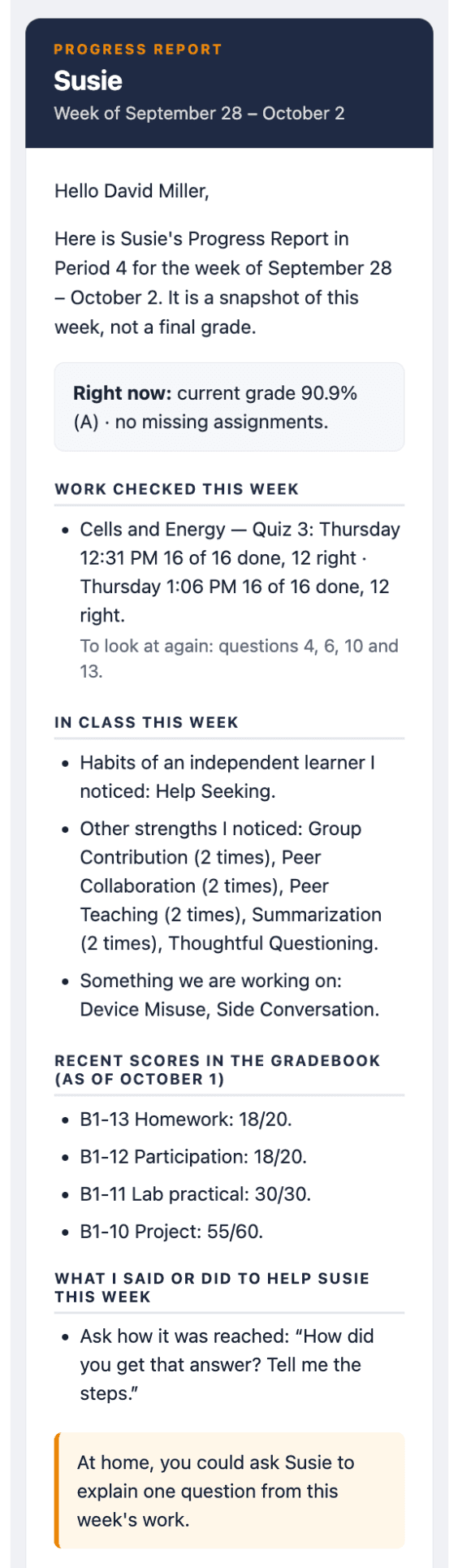
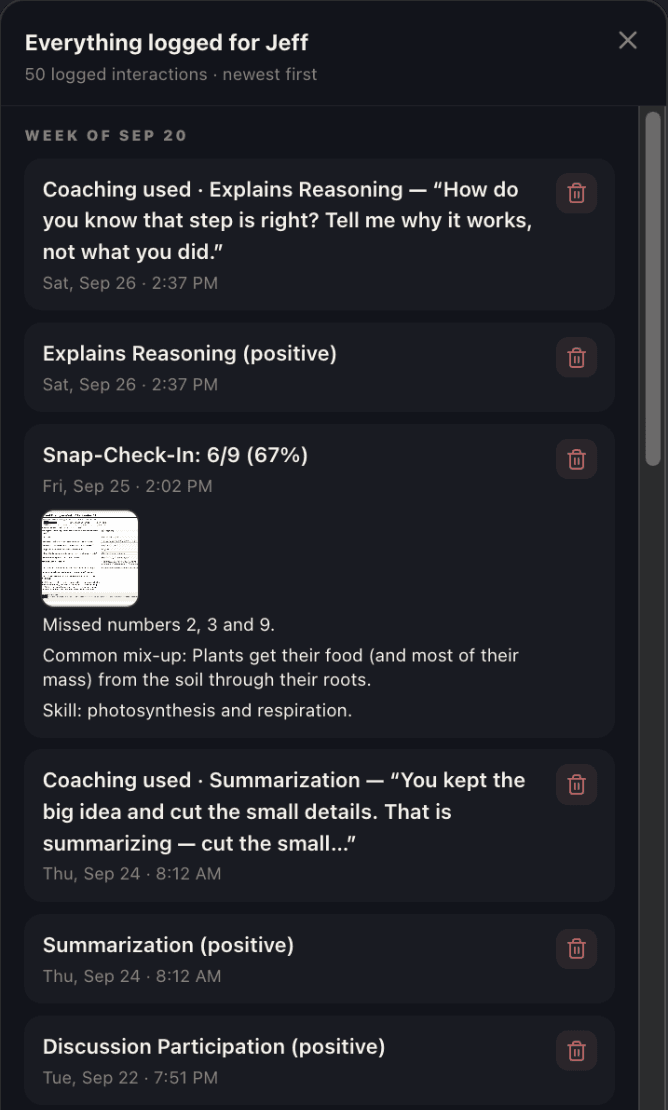
Here’s the record itself — one student, everything you logged in order and searchable: behavior and academics with effect sizes where the research publishes one, your notes, gradebook snapshots, attendance, and photos of their work. Tap Send and it becomes the parent or counselor brief.

Timeline · Daniel CruzReal record
88% grade1 tardy2 missing
🔍 Search this student’s interactions…
AllBehaviorNotesGradesPhotos
📷

Work photo

Photo · Jun 3, 1:20 PM

Explains Reasoning

Elaboration & organization · d ≈ 0.7 · Hattie

Behavior / Academic · May 28, 9:14 AM

Grade 88% · 2 missing

From a photo of the gradebook

Gradebook · May 24

Great reasoning in the lab today

Note · May 20, 10:02 AM

Task Avoidance

Engagement / self-regulation observation

Behavior / Academic · May 18

Parent update drafted

Parent contact · May 15

The parent brief, exactly as it sends

Page one of a real Parent Update PDF for demo student Daniel Cruz, Period 3, Grade 9, Lincoln High. It opens “Dear Ms. Cruz,” and reports four strengths observed, one growth area and two check-ins; an attendance and work row reading 2 absences, 3 tardies, 4 missing assignments, 83% current average; a What is going well list; a Where we can grow list; and a Full timeline table of every logged moment with its date, type and note.
03. End of class — the parent-ready brief, one tap away. This is a real PDF from the app, not a mock-up of one.

Screens 01–02 are the live app; 03 is an actual PDF built by the app on a device, page one of two. Demo class — every student shown is fictional.

James Morris, founder of Teacher Supreme

Created by a teacher

James C. Morris, M.Ed.

After 35 years in the classroom, James Morris designed and created Teacher Supreme — a fast, safe way to document student interactions. Teacher-voice trigger. One-button rapport log. Speak or tap to log academics and behavior. Tap to build a Parent or Counselor brief. It remembers what you logged — that Sophia argued from evidence in third period on the fourteenth — and shows you the words to say to Sophia the next time it happens.

Questions teachers ask

The eight that come up before anyone signs up.

Every answer written from what Teacher Supreme actually does. Tap one to open it.

Is there a free trial, and do I need a card to start?

Yes — 28 free days, every Basic and Plus feature unlocked, and no card is needed to start. The clock begins when you add your first real class roster, not when you sign up; signing up alone starts nothing.

Will I get charged automatically after the trial without warning?

No, and it is not possible. We do not collect a credit card to start, and we do not collect one during the trial unless you choose to subscribe early — so there is no card on file to charge when day 28 arrives. The 28 free days are deliberate: use it with your own students and decide for yourself whether it is worth $5 a class. If it is, subscribe any time — early, or when the trial ends. If it is not, do nothing: the paid features simply stop, nothing is billed, and your own record is still yours to export.

How much does Teacher Supreme cost — Basic vs. Plus?

Basic is $5 a month per class. Plus is $10 a month per class. Each class covers up to 50 students, and you only pay for the classes you actually teach — there is no separate account fee on top. Three classes on Basic is $15 a month; three on Plus is $30.

Where does my students' data actually live — on my phone or in the cloud?

Almost everything lives on your own phone: full names, photos, parent contact info, ID numbers, IEP/504 and medical notes, and your written notes, all encrypted by your device's own operating system. The cloud backup only ever receives a first name and last initial, an anonymous student code, and interaction timestamps — never a full name, photo, or parent contact. The device is where the real record lives; the cloud is a thin, de-identified backup.

What can the AI see about my students, and what can't it see?

For anything typed or spoken, the AI never sees a student's name — your phone swaps every name for a code like STU-001 before sending, and only your phone turns the codes back into names when the reply comes back. For a photo you deliberately ask it to read, like an attendance sheet, the name is the data being read, so your phone codes or blacks out the names in the pixels first — for every photo flow except a first roster import, which has no roster yet to check names against.

Can my principal read my log?

No. Your interaction log is private, and that is enforced in the database itself — every read and write reduces to a single check of whether the record belongs to your own account, so there is no key that unlocks another account's records for management to view. If your school licenses the district product, admins see aggregate trends across classrooms, never your individual entries.

How long does setting up my class take?

Most of setup is optional and skippable — only adding a roster is asked for up front (by photo, spreadsheet, or typing), and the bell-schedule step can be added later from the More tab. A single-photo roster import is the fastest path: review the names it found and tap Save.

Can I export all my data, and what's actually in the export?

Yes — under More → Archive, one tap downloads a single backup file with everything stored on your device: your full roster (names, photos, parent contacts), every logged interaction, behavior and attendance records, paper-trail notes, and seating charts. On Basic and up, More → Export also gives one-tap CSV downloads of your roster and your logged interactions, built entirely on your own phone.

All 52 questions, answered plainly →

Inspired in a classroom, for classrooms.

Start your 28-day free trial — no card required to start.

Questions first? 52 answers →

Already a member? Sign in