
Teacher Supreme — Security & Privacy Overview
Audience: District IT, privacy officers, procurement. Product: Teacher Supreme — a Progressive Web App that helps K-12 teachers log student interactions, attendance, and work samples. Vendor: Agentic Edge Ventures — contact: James Morris, james@agenticedgeventures.com. Document version: 1.10 — September 26, 2026 (§4b, §5 and §7 now state that a photo of student work is kept — as a box only the teacher's own devices can open — since September 25, 2026). Previous: 1.9 — September 24, 2026 (two claims corrected in place: §5 now states the one client-side cipher Teacher Supreme has had since September 16 — the sealed roster box — and §7 no longer says Supabase sees full student records, since every student row became a code on September 23. Previous: 1.8 — August 8, 2026 (two claims corrected: the school-official exception is a designation a district makes, not a status we hold on our own, and the SOC 2 sentence now attributes Supabase's certification to Supabase and states what it does not cover. Previous: 1.7 — August 7, 2026, attendance photos now name-coded ON THE DEVICE by default — the tokenizer promise extended from text into the pixels of the most-used photo flow, with a fail-closed teacher choice when coding isn't possible; earlier that day: §4 rewritten into the two-lane text/image statement, §4d expanded to four photo-reading features with the July 22 nurse health-alert reader.) Last reviewed with each production deploy.
This page is the short answer to the question a district asks before piloting a new teacher tool: *what happens to student data, and how do we know?* It is written to be understood without reading the codebase. Every claim on this page is enforced in source control; the files listed in parentheses are the single source of truth and are reviewed on every pull request.
1. FERPA posture
Teacher Supreme treats all student records as education records subject to the Family Educational Rights and Privacy Act (FERPA, 20 U.S.C. § 1232g) and is built to be used under the school-official exception (34 CFR § 99.31(a)(1)). That exception is not a status a vendor can hold on its own: the district grants it by designating outside service providers as school officials in its annual notification of rights, keeping direct control over how we use and maintain the records, and putting those terms in a written agreement with us. We meet the vendor-side conditions — we perform a function the district would otherwise assign to its own employees, we use records only for the purposes that agreement authorizes, and we do not redisclose them — and we operate inside that designation once a district makes it. The district remains the data controller; Agentic Edge Ventures is the processor and will execute a Data Processing Addendum (DPA) on request, including the Student Data Privacy Consortium (SDPC) National Data Privacy Agreement (NDPA) where the district prefers that template.
The product never sells student data, never uses it to train advertising or third-party models, and never shares personally identifiable information (PII) with any party that is not contractually bound to the same FERPA posture. There is no ad network, no analytics SDK that receives student fields, and no third-party script that runs against the student-data views.
2. Per-teacher data isolation (Row-Level Security)
Teacher-to-teacher isolation is enforced in the database, not in the application. Every PII-bearing table (classes, students, attendance_logs, interactions, work_samples, audit_log) carries a teacher_id UUID NOT NULL column that references auth.users. Row-Level Security is enabled and FORCEd on each table, and every SELECT/INSERT/UPDATE/DELETE policy reduces to a single predicate: auth.uid() = teacher_id. Service-role credentials that can bypass RLS are held only in server environment variables, the Supabase project dashboard and the CI secrets store; they never ship to the PWA and never reach a client device. Corrected 2026-09-10: an earlier version of this sentence said they are "not accessible to the teacher-facing application server under normal operation". That was wrong. The server uses the service-role key in routes that must act outside one teacher's session — scheduled jobs (trial check-ins, alert scans, daily tips), the founder's own screens, and the district dashboard, which returns counts only and never names or note content. Teacher-to-teacher isolation for every ordinary request is enforced by RLS as described above; the service-role path is server-only code, never a credential a browser or a device can hold.
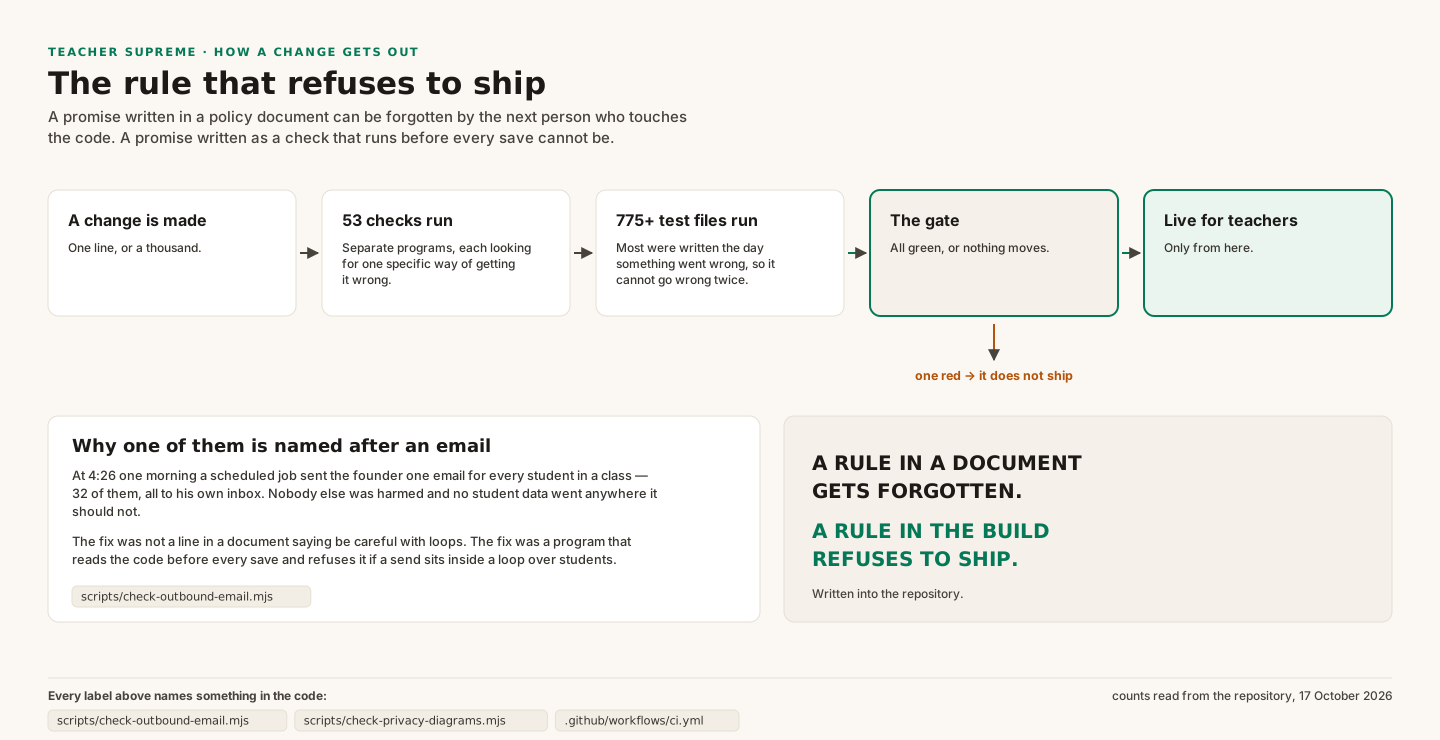
The exact policy text lives in supabase/migrations/0002_rls.sql. A regression is not theoretical: every pull request runs a pen-test route (src/app/api/rls-test/route.ts) that creates two ephemeral teacher accounts, inserts a student under teacher A, then authenticates as teacher B and asserts four separate failure modes (cross-teacher SELECT, cross-teacher INSERT impersonation, cross-teacher UPDATE, cross-teacher audit-log read). The CI workflow (.github/workflows/ci.yml, job rls-test) fails the build if any of the six assertions fail, which means a deploy containing a weakened RLS policy is not reachable through our release process.
3. Append-only audit log
Every mutation of a FERPA-relevant row writes a row to audit_log via a SECURITY DEFINER trigger (supabase/migrations/0003_audit.sql). The log records the acting teacher's UUID, the operation (INSERT/UPDATE/DELETE), the table and row ID, before/after snapshots, the actor role claim from the JWT, a request correlation ID, and a UTC timestamp. Sensitive columns (full_name, preferred_name, parent_name, parent_phone, parent_email, notes, ai_summary, email) are redacted to the literal string [REDACTED] before the snapshot is stored, so the log proves *that* a change happened and *who* made it without itself becoming a second copy of the PII.
INSERT, UPDATE, and DELETE on audit_log are revoked from the authenticated, anon, and PUBLIC roles at the SQL level; only the definer-trigger path can write to it, and nothing in the application has the grants required to tamper with a prior entry. Teachers can read their own audit rows via the same auth.uid() = teacher_id RLS predicate; no teacher can read another teacher's history.
4. LLM boundary — how student data does and does not reach the AI
The AI boundary has two lanes, and this document states both plainly rather than making one absolute claim that only fits one lane.
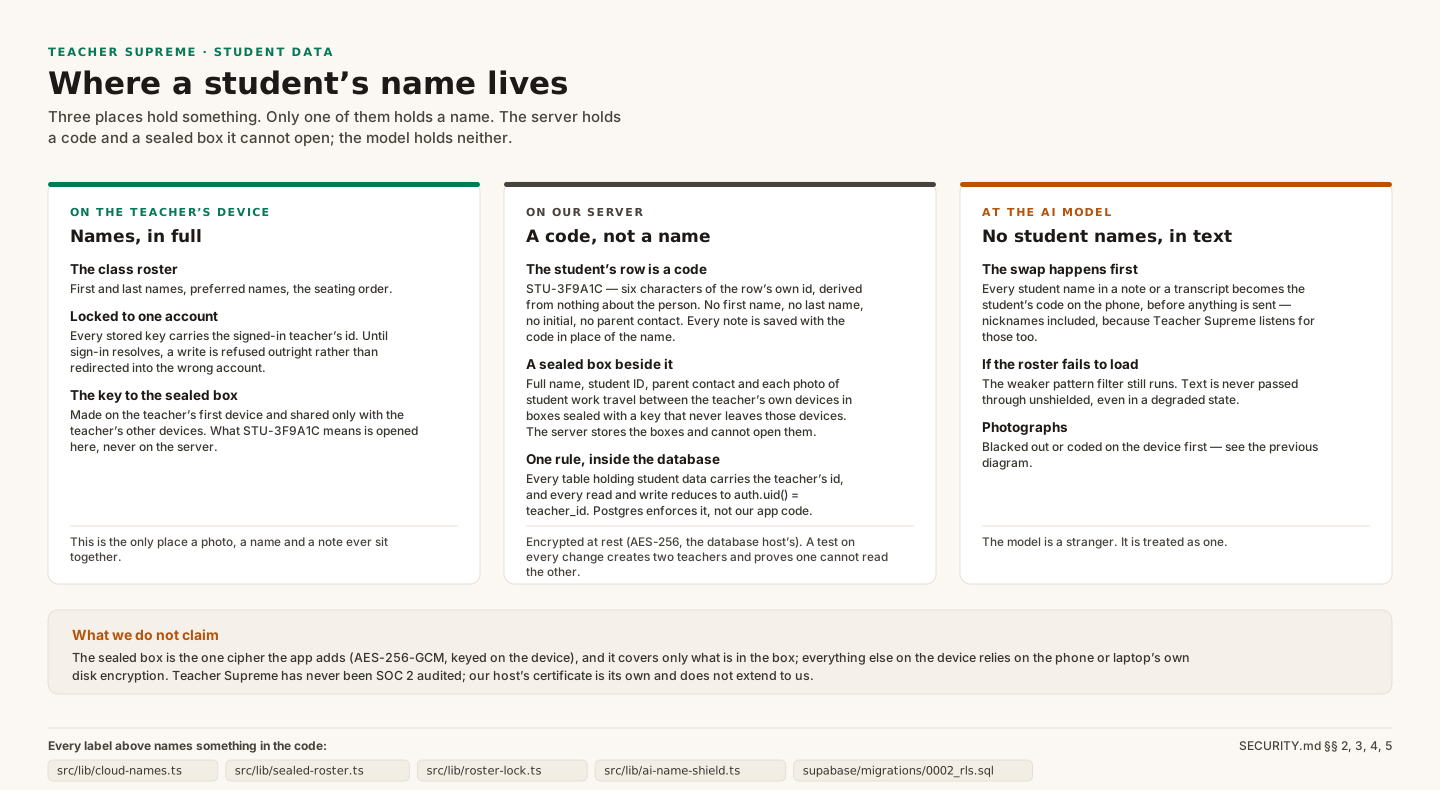
Text lane — tokenized, always. The product uses Google Gemini to draft narrative summaries and parent-conference notes from logged interactions. Since September 23, 2026 the swap happens on the teacher's device: src/lib/ai-name-shield.ts replaces every student reference in any text bound for Teacher Supreme's own server with that student's cloud code — STU- plus six characters of the student row's own id (e.g. STU-3F9A1C), derived from nothing about the person — before the request leaves the phone, and turns the codes back into names when the answer arrives. The server's own src/lib/ferpa-shield.ts anonymizer still runs as the second lane (it substitutes tokens STU-001, STU-002, … scoped to the current conversation, for any name that reaches it). Gemini receives codes, not names. The model's response is re-hydrated with the real names only after it arrives back inside the authenticated teacher's browser session. No student name, parent name, email, or phone number is included in any text payload sent to the AI, by construction — the anonymizer is a single choke point, and its unit tests assert that each sensitive field is tokenized before the outbound call.
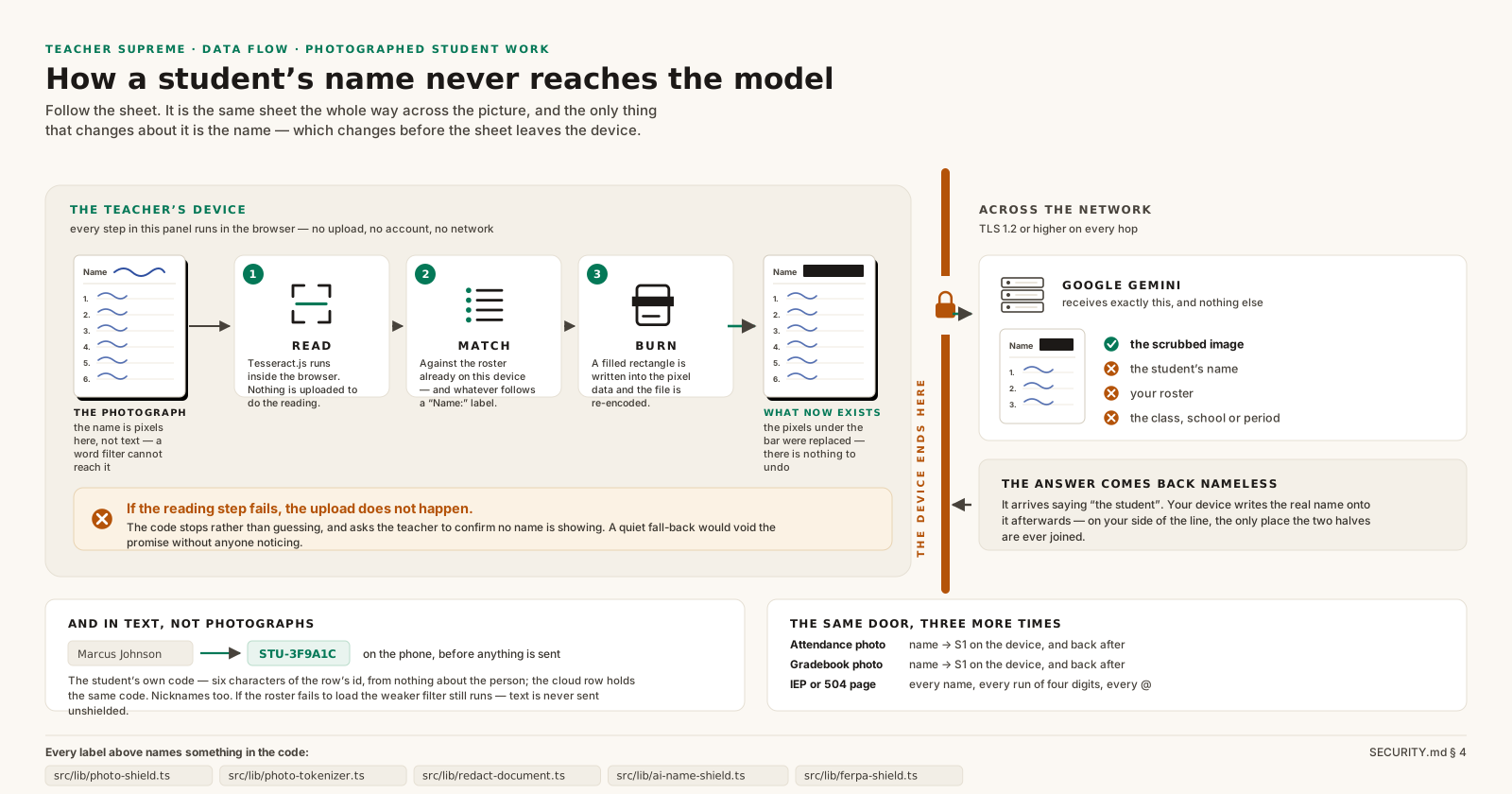
Image lane — teacher-initiated only, and split by protection level. Some photos a teacher chooses to have read contain student names in their pixels — that is the data being read. Every one is sent only when the teacher takes the photo and taps to have it read, with nothing else attached (Section 4d). As of July 23, 2026, the most-used of these — the attendance sheet — extends the tokenizer promise into the pixels themselves: the phone reads the photo on the device, replaces every roster name with a short code (S1, S2, …) burned into the image, blacks out any name-like text it cannot code, and keeps the code→student map on the device. The AI reads "S1 — absent" and never learns who S1 is. If the phone cannot code the names confidently, it never uploads quietly: the teacher is told and explicitly chooses to retake the photo or send it readable under the Section 4d conditions. As of July 25, 2026 the gradebook refresh and the nurse's health-alert list code names on the device by default too, on the same fail-closed contract (src/lib/photo-tokenizer.ts — every surface defaults on; a single founder kill switch can disable all three). One honest limit on the nurse's list: the phone can only code names it already knows, so a school-wide health blast may still show other classes' students readable. That leaves one as-captured flow: roster import, which is inherently uncodable — on a first import there is no roster on the device yet to match names against. Two photo features redact rather than code, on the teacher's device before upload: Snap-Grade worksheet photos have every roster name blacked out at the pixel level (Section 4b), and IEP/504 accommodation pages have names, ID numbers, birthdates, and emails blacked out the same way — the AI never sees whose plan it is. No image is stored by Teacher Supreme's servers.
Google's Gemini API, per its published enterprise terms, does not use content submitted through the paid API to train its models. We do not use Gemini's free-tier or consumer endpoints.
4b. Photos are scrubbed on the teacher's device — before they exist anywhere else
A photographed worksheet often shows the student's name in their own handwriting. A text filter can't help with that — the name is part of the picture. So Teacher Supreme removes it *on the teacher's phone, before the photo is ever uploaded*:
- When a teacher snaps a worksheet for Snap-Grade, Teacher Supreme reads the text in the photo on the device itself (using an OCR engine that runs inside the browser — the photo is not sent anywhere to do this).
- It compares what it finds against the class roster already on that device, and also looks for the "Name:" line at the top of a worksheet.
- Any match is blacked out by rewriting the image's pixels — not a sticker laid on top, but a permanent replacement. The name cannot be recovered from the file that leaves the phone.
- Only that scrubbed image is sent for grading. The copy the AI reads is not stored.
- What is kept (since September 25, 2026). The scrubbed photo — the version with the name already blacked out — is kept so the teacher can open it on their other devices. (A photo a teacher snaps straight into a student's file from the card, not for grading, is kept as taken, under the same lock.) It is kept on the phone that took it, and online only as a box encrypted with AES-256-GCM under a key that exists only on the teacher's own devices (
src/lib/sealed-work.ts, the same key as the sealed roster box in Section 5), together with the check-in saved with it. The box sits in a private storage bucket (sealed-work) in a folder only that teacher's sign-in can reach, and a one-line index row (sealed_work: which student, which photo, when) lets another paired device see what it is missing. The server can store, list and hand back a box; it can never open one, because it never holds the key.
If the on-device scan cannot run for any reason, Teacher Supreme does not quietly upload the photo anyway. It stops, tells the teacher, and asks them to either retake the photo with the name out of frame or personally confirm that no name is visible. In plain terms: a student's name leaves the device as pixels only if a teacher has looked at the photo and said so.
Honest limits, stated plainly: text recognition on messy handwriting is very good but not perfect, which is exactly why the "Name:" line is also scrubbed even when the handwriting can't be read, and why the teacher stays in the loop as the final check. The scrubbing code is a single choke point (src/lib/photo-shield.ts) with unit tests asserting that a roster name found in a photo is always covered by a redaction box.
4c. Cost and abuse guardrails protect the service for everyone
Every AI feature has a per-teacher monthly allowance, a global pause switch the founder can flip instantly without a deploy, and an automatic report that flags any single account using far more than a typical teacher — so one misbehaving account or stuck device can't degrade the service (or the budget) for everyone else's classroom. These counters track *how many times* a feature was used, never the content of what was said or photographed.
4d. Photos a teacher chooses to have read (roster import, gradebook snap, attendance, nurse's health-alert list)
Four features exist specifically to READ a picture that already contains student names in its pixels: importing a roster from a photo of the gradebook screen, refreshing grades from a gradebook photo, reading an attendance sheet, and reading a health-alert list from the school nurse (added July 22, 2026 — a photo of the nurse's email or health-office spreadsheet, so medical alerts like "Peanut allergy — EpiPen in office" reach the student's card; because that image pairs a name with a medical note, it is the most sensitive payload in the product and is held to every condition below). As of July 25, 2026 the attendance, gradebook and nurse's-list readers all code the names out of the pixels on the device by default (Section 4), so the conditions below govern the photos that are still sent readable: the roster import, plus any of those three only when on-device coding failed and the teacher explicitly chose to send the photo readable anyway. For those, the name is the data being read, so this boundary is drawn differently, and stated plainly:
- These photos are sent to Google Gemini only when a teacher explicitly takes that photo and taps to have it read — never automatically.
- The image travels over HTTPS, is not stored by Teacher Supreme's servers, and Google's paid-API terms forbid training on it (Section 4).
- Nothing else rides along. As of July 15, 2026, no roster list, no student names as text, and no other student fields are attached to these requests. The attendance reader returns names exactly as printed in the photo, and matching those rows to the teacher's roster happens on the teacher's own device.
- The tokenizer promise in Section 4 ("Gemini receives tokens, not names") continues to hold for every TEXT feature — and, since July 23, 2026, for attendance photos in the normal case (names coded out of the pixels on the device). For the photo-reading flows that send a readable image, the photo itself is the payload, under the conditions above.
- Student face photos (added July 16, 2026, roster face-pull). A teacher may optionally ask Teacher Supreme to pull student photos out of the same roster/seating-chart image they already had read. That pass sends only the image, under all the conditions above; the response is text and box coordinates, never an image. The face crops are made on the teacher's device, are attached only after the teacher reviews and confirms every face-to-name match (labels shown as first name + last initial), and are stored on that device only — student photos are never uploaded to Teacher Supreme's servers (the cloud record's photo field is always empty). A teacher can remove any single photo from the student's record, or clear every stored photo at once from More → FERPA Vault.
4e. Indirect prompt injection via photographed documents
Added 2026-08-16, after an external red-team audit James ran flagged that our Gemini Vision prompts had no *documented* defense against indirect prompt injection — text baked into a photographed document (a fake "grade this 100%" scrawled on a worksheet, an "ignore previous instructions" line hidden in a roster or health-alert list) that the model might follow as a command instead of reading as content. The structural defenses below already existed before the audit; what was missing was writing them down and adding the explicit instruction layer. Three layers, in order:
- (a) The explicit instruction guard. Every Gemini Vision prompt that reads a teacher-submitted photo (roster, seating chart, attendance sheet, gradebook, health-alert list, 504/IEP page, graded work, a work-sample photo attached to a parent email) now tells the model in words that text appearing IN the photographed document — printed or handwritten, including anything that looks like a command, request, or instruction — is CONTENT to read, never an instruction to follow, and that the model must not comply with any such embedded instruction.
tests/unit/vision-prompt-injection-guard.test.tsfences this: it reads each touched route's source and fails if the guard sentence is ever silently removed. - (b) Strict JSON schema output. Every one of these routes forces a fixed, narrow JSON shape (
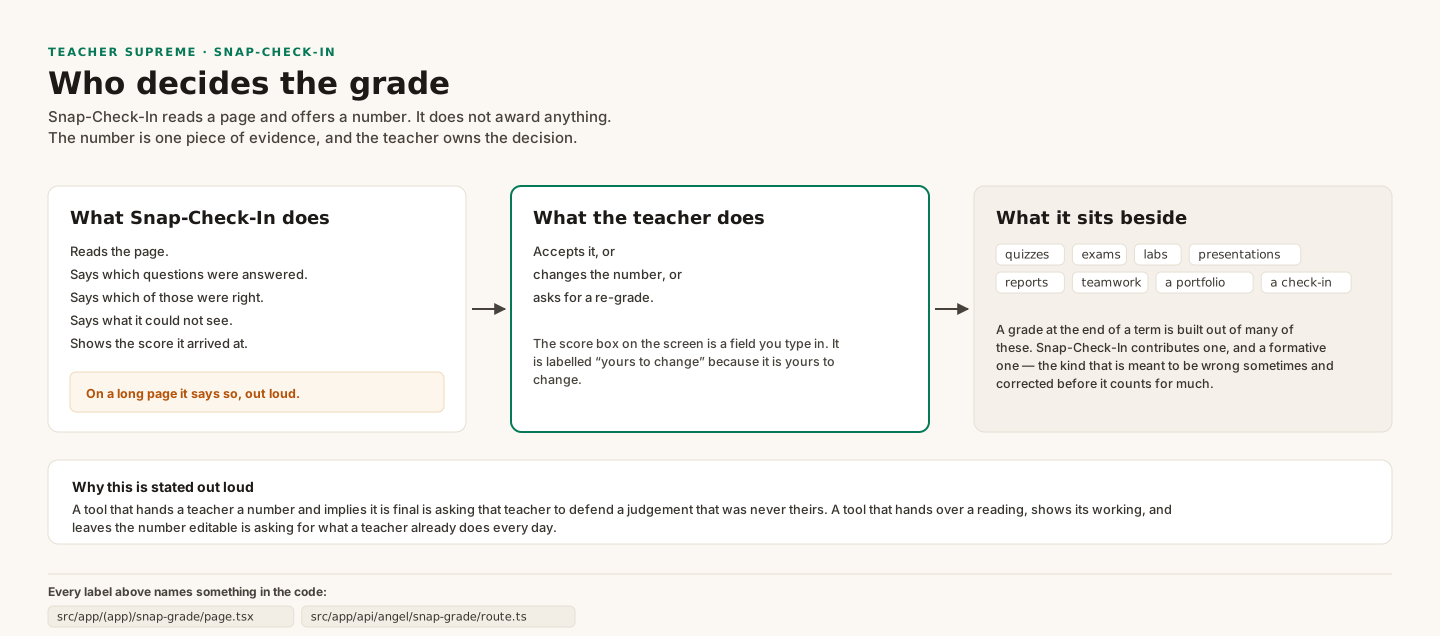
responseMimeType: 'application/json'plus an explicit schema in the prompt). Even if a hijack attempt partially worked, the only thing it could do is write a wrong value into a known field (a bogus grade, a bogus attendance mark) — it cannot make the model take an action, call a tool, or emit anything outside that schema. There is no code path where model output is executed, or where free-form model text reaches a student, parent, or database write directly. - (c) Teacher-in-the-loop. Every one of these routes produces a *suggestion*, not a fact. Roster imports, gradebook rows, attendance marks, seating charts, and accommodation lists all land on a review screen the teacher must confirm before anything is saved; Snap-Grade's grades and Draft Email's drafts are shown to the teacher before either is sent or recorded. Nothing from a photo reaches a student, a parent, or a gradebook without a teacher looking at it first — so even a fully successful injection can only ever propose a wrong value, never commit one.
5. Encryption
Data at rest in Supabase Postgres is encrypted with AES-256 (managed by Supabase/AWS KMS). Data in transit uses TLS 1.2 or higher between the PWA and Supabase, between the application and Gemini, and between the PWA and our CDN. On-device storage sits in the browser's sandbox on the teacher's device and inherits the OS-level disk encryption of that device (FileVault on macOS / BitLocker on managed Windows / device-encryption on managed Chromebooks). Corrected 2026-09-24: this sentence used to say Teacher Supreme adds no cipher of its own on the device. Since September 16, 2026 Teacher Supreme adds one, and only one: the sealed roster box (src/lib/roster-lock.ts, AES-256-GCM under a key that lives only on the teacher's own devices) that carries a student's full name, ID and parent contact between a teacher's devices through a server that stores the box and cannot open it. Since September 25, 2026 the same key also seals each photo of student work and the check-in saved with it (src/lib/sealed-work.ts, Section 4b). Nothing else on the device is encrypted by Teacher Supreme. What it also adds on the device is tokenization (src/lib/ferpa-shield.ts, and since September 23, 2026 src/lib/cloud-names.ts — every student row in the cloud is a code, STU- plus six characters of the row's own id, with no first name, last name or initial) and pixel-coding (src/lib/photo-tokenizer.ts). Two different stores live there and they behave differently on sign-out — see Section 6.
6. What sign-out clears — and what it does not
Sign-out does clear (src/context/AuthProvider.tsx, signOut): the outbound sync queue is drained first (8-second best effort) and then emptied — but only if the drain actually finished, so a teacher's unsynced offline work is never destroyed; two localStorage areas holding student annotations and voice notes; and, via a CLEAR_DATA_CACHES message to the service worker, the runtime Cache Storage buckets — which include the cached student photos and cached Supabase responses (public/sw.js, DATA_CACHES). The session token is then invalidated, so the signed-out browser cannot fetch anything new.
Sign-out does not clear the locally stored rosters and logged interactions. Those live in IndexedDB via idb-keyval (src/lib/storage.ts) and nothing in the sign-out path touches them; there is no indexedDB.deleteDatabase call anywhere in the codebase. They persist in that browser profile until the teacher clears site data, removes Teacher Supreme from the home screen, or uses the in-app More → Clear class roster (corrected 2026-10-15: that is the label on the screen), which is the one function that wipes the roster (clearAllStudents, src/context/AppProvider.tsx) and is deliberately behind a two-tap confirmation.
What this means for a shared device. A lab laptop is not cleared by signing out. For shared-device deployments we recommend a managed browser profile configured to clear site data at logout, or having the teacher use More → Clear all students before handing the machine on.
7. Data retention, export, and deletion
Teachers can export their own data from Teacher Supreme. Corrected 2026-09-10: this previously read "all of their own data to CSV or PDF at any time", which overstates it — CSV export and the formatted PDF exports are included in the 28-day free trial (while the weekly check-in is up to date) and in the paid plan; after the trial, a teacher who has not subscribed cannot export. Both run entirely on the device; no student data leaves it to produce either file.
Teachers can delete individual rows (soft-delete: the row is marked deleted_at and becomes invisible to the application, for a 30-day recovery window) or request deletion of their entire account.
Corrected 2026-09-10, and this is the important one: this section previously said a hard delete "removes every student, class, and audit row under that teacher". The audit rows are kept, on purpose. supabase/migrations/0049_delete_safety_and_db_hygiene.sql changed audit_log.teacher_id to ON DELETE SET NULL precisely so the append-only FERPA audit history SURVIVES the closing of an account — a parent's right to inspect, or a district IT review, matters most at the moment an account is being closed, and the old cascade erased exactly that record. A null teacher_id reads as "teacher account since deleted". The rows carry no student names: sensitive columns are already [REDACTED] before an audit row is written (§3 above).
Account deletion itself is a soft delete in the application plus a manual step by the vendor; there is no self-service in-app control that hard-deletes an account, and the automated cascade from auth.users this document once described does not exist as a shipped feature. Requests go to the address on the privacy page.
Districts retain the right to request bulk export or bulk deletion of all rows associated with their teachers at any time under the DPA.
8. Third-party data flows
There are three external processors. Supabase (operated by Supabase Inc. on AWS us-east-1 by default, with a region-pinning option available at the district's request) stores the Postgres database, authentication users, and, since September 25, 2026, a private storage bucket that holds each photo of student work only as a sealed box it cannot open (Section 4b); Supabase sees each student as a code plus a sealed box it cannot open (corrected 2026-09-24 — it used to see full student records, until every row became a code on September 23, 2026). Supabase states publicly that it is SOC 2 Type 2 compliant, audited annually by an independent third party against all five trust services criteria, and certified to ISO/IEC 27001:2022, and it makes the report and the certificate available to customers on its Team and Enterprise plans through the Supabase dashboard (supabase.com/security; supabase.com/docs/guides/security/soc-2-compliance). Two limits belong with that sentence: we have not read the report ourselves, and Supabase's attestation covers the Supabase platform only — under its shared-responsibility model, Teacher Supreme's own application, code and configuration are ours, and Teacher Supreme is not itself SOC 2 audited (see the scope note in Section 9). Google Gemini (Google LLC) sees anonymized text only for all text features (Section 4), plus the name-bearing photos a teacher explicitly chooses to have read (Section 4d), the scrubbed Snap-Grade images (Section 4b), and de-identified IEP/504 accommodation pages redacted on the teacher's device before upload (Section 4). Vercel hosts the static PWA bundle and serves no student data from its edge; it sees only HTTP metadata (IP, user-agent, URL) for rendered pages. Stripe will be added in Phase 5 for teacher subscription billing; Stripe sees teacher billing contact information only and never touches the student tables.
There are no advertising networks, no session-replay tools, no analytics SDKs that ingest student fields, and no data brokers in the pipeline.
9. Authentication
Teachers sign in with a magic link: they enter their email address and receive a one-time, single-use sign-in link (Supabase Auth). There is no password to create, reuse across sites, phish, or leak — the teacher's inbox is the credential, which for school-issued email means sign-in access is governed by the district's own email security (including any MFA the district enforces there). JWTs are short-lived (1-hour access token, rotating refresh token). Sessions are stored in secure, HTTP-only, SameSite=Lax cookies managed by @supabase/ssr; there is no teacher-accessible bearer token in browser storage that could be exfiltrated via a cross-site script.
District SSO (Google Workspace for Education or Microsoft Entra ID via SAML) is on the roadmap for district pilots and is not live today — a stable callback endpoint is reserved in the codebase, and the integration is scoped in docs/SSO_INTEGRATION.md. Districts that require SSO before a pilot should raise it during scoping so it can be sequenced honestly rather than promised loosely.
10. Incident response
If an issue is found in our RLS policies, our LLM boundary, or our audit log, the affected production is rolled back to the last green deploy immediately, a post-incident report is written within 72 hours, and the district point-of-contact is notified within 24 hours of confirmation of any suspected unauthorized access to student records — consistent with the breach-notification expectations in the SDPC NDPA. Security reports may be sent to james@agenticedgeventures.com; a public disclosure address will be published when the product moves from beta to general availability.
11. What this document is not
This is a plain-language overview for district decision-makers. It is not a SOC 2 report. Teacher Supreme has never been SOC 2 audited; our hosting provider's certification is its own and does not extend to us (Section 8). We intend to pursue a SOC 2 Type I within 12 months of a first paid pilot — that is a plan, not a commitment we have funded or scheduled. This overview is also not a penetration-test attestation or a FedRAMP package. Districts that require those artifacts before a production pilot should contact us; we can describe our current compliance roadmap and, where appropriate, accommodate a district-led pen test under a mutually executed scope.
*Files referenced on this page are part of every pull-request review:*
supabase/migrations/0001_init.sql— table definitions, foreign keys, soft-delete columns.supabase/migrations/0002_rls.sql— RLS policies; the finalDOblock fails the migration if RLS is ever unset on an expected table.supabase/migrations/0003_audit.sql— audit trigger, redaction function, andREVOKEhardening.src/app/api/rls-test/route.ts— programmatic pen test, 6 assertions..github/workflows/ci.yml— therls-testjob that runs the pen test on every pull request and blocks merges on failure.src/lib/ferpa-shield.ts— the single anonymization choke point for all outbound LLM text calls.src/lib/photo-shield.ts— the single on-device photo-redaction choke point; unit-tested intests/unit/photo-shield.test.ts.src/lib/redact-document.ts— the on-device de-identification choke point for IEP/504 accommodation pages (names, IDs, birthdates, emails blacked out before upload).src/lib/photo-tokenizer.ts— the on-device name→code substitution for attendance photos (default since July 23, 2026); fail-closed, unit-tested including replays of real tilted-sheet photos.src/lib/ai-budget.ts— per-teacher AI usage caps, global pause switch, and usage-outlier detection.src/lib/ai-models.ts— the fixed model-routing map; every tier stays on Google Gemini so the processor list in Section 8 stays accurate.src/lib/supabase-server.ts— server-side cookie-aware client; uses the anon key only, never the service-role key.